
Quick answer: The best Databricks alternatives depend on workload. Snowflake suits SQL-first analytics. BigQuery suits serverless analytics on Google Cloud. Microsoft Fabric suits Microsoft-centric teams. Self-managed Apache Spark suits cost-conscious engineering teams. Cloudera suits on-premise needs. Each trades Databricks’ unified lakehouse for simplicity, cost control, or deployment flexibility.
Databricks is a strong platform, but it is not the right fit for every team. This guide compares 15 Best Databricks alternatives and competitors by workload, cloud, pricing model, and migration effort. It is written for data engineers, platform leads, and cost owners who are weighing a switch or a first purchase.
Top 15 Best Databricks Alternatives
The 15 tools below are grouped by category, and each section follows the same structure. Read the verdict first, then check limitations and migration effort.
1. Snowflake (Cloud data warehouse)
Verdict: Snowflake is the best Databricks alternative for SQL-first analytics and governed data sharing.
What it is: Snowflake is a cloud data platform that separates storage from compute. Analysts run SQL on virtual warehouses, and the platform also supports Python, Apache Iceberg tables, and AI features.
Best for: Analytics teams that want low administration and strong SQL performance.
Key strengths vs Databricks:
- Simple operations with little cluster tuning.
- Mature data sharing and marketplace capabilities.
- Familiar SQL experience for analysts and BI users.
Limitations:
- Less natural for heavy Apache Spark or custom ML pipelines.
- Compute costs can climb with always-on or oversized warehouses.
Pricing model: Credits consumed by virtual warehouse compute, plus storage. See Snowflake’s pricing page for current structures.
Migration effort from Databricks: Medium. SQL ports easily, but Spark code and notebooks need rewriting.
Cloud and deployment: AWS, Azure, GCP (multi-cloud).
2. Google BigQuery (Cloud data warehouse)
Verdict: BigQuery is the best Databricks alternative for serverless SQL analytics on Google Cloud.
What it is: BigQuery is Google’s serverless data warehouse. It needs no cluster management and supports SQL, Spark stored procedures, BigQuery ML, and Apache Iceberg tables.
Best for: Teams on Google Cloud with large, bursty analytical workloads.
Key strengths vs Databricks:
- No infrastructure to size or tune.
- Pay-per-query option suits unpredictable workloads.
- Tight integration with Google Cloud services and Vertex AI.
Limitations:
- Locked to Google Cloud.
- On-demand pricing can surprise teams that scan wide tables carelessly.
Pricing model: Per data scanned (on-demand) or reserved slot capacity, plus storage. See BigQuery’s pricing page.
Migration effort from Databricks: Medium. SQL transfers well, while Spark jobs and Delta tables require rework.
Cloud and deployment: GCP.
3. Amazon Redshift (Cloud data warehouse)
Verdict: Redshift is the best Databricks alternative for warehousing inside an AWS-centered architecture.
What it is: Amazon Redshift is AWS’s columnar data warehouse. It runs as provisioned clusters or as Redshift Serverless, and it queries S3 data through Spectrum.
Best for: AWS-heavy organizations that want warehousing close to S3, IAM, and Glue.
Key strengths vs Databricks:
- Deep integration with AWS identity, networking, and billing.
- Serverless option removes cluster sizing.
- Federated queries across S3 and operational databases.
Limitations:
- Weaker fit for Spark-heavy engineering and ML workflows.
- Provisioned clusters need capacity planning.
Pricing model: Provisioned node hours or serverless capacity units, plus storage. See Redshift’s pricing page.
Migration effort from Databricks: Medium. SQL is portable, but Spark and notebook workloads need replacement.
Cloud and deployment: AWS.
4. Microsoft Fabric with Azure Synapse Analytics (Cloud data warehouse)
Verdict: Microsoft Fabric is the best Azure-native Databricks alternative for teams built around Power BI and Microsoft 365.
What it is: Fabric is Microsoft’s unified analytics platform covering data engineering, warehousing, real-time analytics, and BI on OneLake storage. Azure Synapse Analytics is its predecessor, and Microsoft positions Fabric as its strategic direction.
Best for: Microsoft-centric organizations that want one capacity-based product.
Key strengths vs Databricks:
- Native Power BI and Microsoft Entra integration.
- Single capacity model across workloads.
- OneLake simplifies storage access, with Delta-based tables.
Limitations:
- Younger platform with a faster-changing feature set.
- Less proven than Databricks for very large Spark workloads.
Pricing model: Capacity units purchased by SKU, shared across workloads. See Microsoft Fabric’s pricing page.
Migration effort from Databricks: Medium. Fabric supports Spark notebooks and Delta, but governance and jobs need remapping.
Cloud and deployment: Azure.
5. Amazon EMR (Managed Spark and ETL)
Verdict: Amazon EMR is the best Databricks alternative for teams that want managed Apache Spark with full control on AWS.
What it is: EMR runs open-source frameworks such as Apache Spark, Hive, Trino, and Flink on EC2, EKS, or serverless. You choose versions, instance types, and configuration.
Best for: Engineering teams comfortable tuning Spark who want lower platform overhead costs.
Key strengths vs Databricks:
- Flexible engine and version choice.
- Spot Instance support for cost control.
- Lower platform fee than DBU-based pricing for many workloads.
Limitations:
- No built-in collaborative notebook and governance experience equal to Databricks.
- More operational work for monitoring and upgrades.
Pricing model: Per-instance-second charges on top of EC2 costs, or vCPU and memory usage for EMR Serverless. See Amazon EMR’s pricing page.
Migration effort from Databricks: Medium. Spark code moves easily, but jobs, catalogs, and notebooks need new tooling.
Cloud and deployment: AWS.
6. Google Cloud Dataproc (Managed Spark and ETL)
Verdict: Dataproc is the best Databricks alternative for managed Spark and Hadoop on Google Cloud.
What it is: Dataproc is Google’s managed service for Apache Spark, Hadoop, and related tools. It runs on Compute Engine clusters, on GKE, or as a serverless option.
Best for: Teams moving existing Spark and Hadoop jobs onto GCP.
Key strengths vs Databricks:
- Fast cluster startup for ephemeral jobs.
- Integrates with BigQuery, Cloud Storage, and Vertex AI.
- Serverless Spark option reduces cluster management.
Limitations:
- Fewer built-in collaboration and governance features.
- Requires Spark expertise for tuning.
Pricing model: A per-vCPU-hour Dataproc charge plus underlying infrastructure, or serverless usage-based billing. See Dataproc’s pricing page.
Migration effort from Databricks: Medium. Spark code transfers, but notebooks, jobs, and Unity Catalog policies need rebuilding.
Cloud and deployment: GCP.
7. Azure HDInsight (Managed Spark and ETL)
Verdict: HDInsight is the best Databricks alternative for Azure teams running existing Hadoop and Spark clusters.
What it is: HDInsight is Azure’s managed service for open-source analytics clusters, including Apache Spark, Hadoop, HBase, and Kafka. It serves teams that need cluster-level control.
Best for: Legacy Hadoop migrations and teams that want open-source engines on Azure.
Key strengths vs Databricks:
- Broad open-source engine selection.
- Cluster-level configuration control.
- Familiar for teams coming from on-premise Hadoop.
Limitations:
- Less modern developer experience than Databricks or Fabric.
- Microsoft’s investment focus has shifted toward Fabric and Azure Databricks.
Pricing model: Billed per node hour, with rates varying by VM size and region.
Migration effort from Databricks: High. You lose managed notebooks, Unity Catalog, and Delta-specific tooling.
Cloud and deployment: Azure.
8. AWS Glue (Managed Spark and ETL)
Verdict: AWS Glue is the best Databricks alternative for serverless ETL and cataloging on AWS.
What it is: Glue is a serverless data integration service that runs Apache Spark and Python jobs. It includes the Glue Data Catalog, crawlers, and visual ETL tools.
Best for: Teams that want scheduled ETL with no clusters to manage.
Key strengths vs Databricks:
- No cluster administration.
- Data Catalog works across Athena, Redshift, and EMR.
- Pay only while jobs run.
Limitations:
- Less suited to interactive development and ML.
- Job startup and debugging can feel slower than notebook-based platforms.
Pricing model: DPU-hours billed per second while jobs run, plus separate catalog charges. See AWS Glue’s pricing page.
Migration effort from Databricks: Medium. Spark jobs port well, but orchestration and notebooks need rebuilding.
Cloud and deployment: AWS.
9. Dremio (Lakehouse and query engine)
Verdict: Dremio is the best Databricks alternative for Apache Iceberg-centered lakehouses with self-service SQL.
What it is: Dremio is a lakehouse platform that queries data in object storage with SQL. It offers a semantic layer, query acceleration through reflections, and Iceberg table management.
Best for: Analytics teams that want warehouse-like speed directly on open-format data.
Key strengths vs Databricks:
- Iceberg-first design reduces format lock-in.
- Semantic layer helps self-service BI.
- Query acceleration without copying data into a warehouse.
Limitations:
- Not a general-purpose Spark or ML platform.
- Smaller ecosystem than Databricks or Snowflake.
Pricing model: Subscription pricing tied to the deployment and compute used.
Migration effort from Databricks: Medium. Delta tables may need conversion to Iceberg, and Spark jobs need a new home.
Cloud and deployment: Multi-cloud and on-premise (self-managed software).
10. Starburst (Trino) and the Apache Iceberg + Trino Open Stack (Lakehouse and query engine)
Verdict: Trino, offered commercially by Starburst or run as an open stack with Apache Iceberg, is the best Databricks alternative for federated and open-format SQL.
What it is: Trino is a distributed SQL query engine that reads data across many sources. Starburst sells managed and self-managed Trino. The open stack pairs Trino with Apache Iceberg tables and a catalog.
Best for: Teams that need federated queries or want no single-vendor storage format.
Key strengths vs Databricks:
- Queries many sources without moving data.
- Open table formats avoid lock-in.
- Engine and storage choices stay independent.
Limitations:
- Not built for heavy ML or notebook-centered workflows.
- The open stack requires you to assemble catalog, security, and orchestration.
Pricing model: Open-source Trino is free to run, and you pay infrastructure. Starburst charges by subscription.
Migration effort from Databricks: High for the open stack and Medium for Starburst, because governance, jobs, and ML must be rebuilt.
Cloud and deployment: Multi-cloud and on-premise.
11. ClickHouse (Real-time and OLAP)
Verdict: ClickHouse is the best Databricks alternative for low-latency analytics on large event and log data.
What it is: ClickHouse is a columnar OLAP database known for fast aggregations. It is open source and also sold as ClickHouse Cloud.
Best for: Real-time dashboards, product analytics, observability, and customer-facing analytics.
Key strengths vs Databricks:
- Very fast aggregation queries on large tables.
- Efficient for high-ingest event data.
- Open-source core with a managed cloud option.
Limitations:
- Not a full lakehouse, ML, or data engineering platform.
- Complex joins and frequent updates need careful modeling.
Pricing model: Free open-source software, or usage-based cloud pricing for compute and storage. See ClickHouse’s pricing page.
Migration effort from Databricks: High. Schemas, queries, and ingestion pipelines must be redesigned for an OLAP engine.
Cloud and deployment: Multi-cloud and on-premise.
12. MotherDuck with DuckDB (Lightweight and small-team)
Verdict: MotherDuck is the best Databricks alternative for small teams whose data fits comfortably on one machine.
What it is: DuckDB is an in-process analytical database that runs SQL on Parquet and CSV files. MotherDuck is a cloud service that adds shared storage, collaboration, and managed execution.
Best for: Startups and analytics teams with modest data and few platform engineers.
Key strengths vs Databricks:
- Minimal setup and administration.
- Fast on single-node workloads.
- Runs locally and in the cloud with the same engine.
Limitations:
- Single-node design limits very large workloads.
- Younger ecosystem, with less enterprise governance.
Pricing model: Plan tiers with usage-based components. DuckDB itself is free.
Migration effort from Databricks: Medium. SQL and Parquet move easily, but Spark code and Delta features do not.
Cloud and deployment: Cloud-hosted service, with DuckDB runnable anywhere.
13. Cloudera Data Platform (On-premise and hybrid)
Verdict: Cloudera Data Platform is the best Databricks alternative for regulated, hybrid estates that must keep data on-premise.
What it is: Cloudera Data Platform (CDP) is an enterprise data platform built on open-source projects, including Apache Spark and Apache Iceberg. It runs in public cloud and in private cloud on-premise.
Best for: Banks, governments, and enterprises with strict data residency rules.
Key strengths vs Databricks:
- Genuine on-premise and private cloud deployment.
- Built-in security and governance tooling for regulated environments.
- Long track record with large Hadoop-era estates.
Limitations:
- Heavier to operate than cloud-native services.
- Slower feature pace than cloud-first platforms.
Pricing model: Enterprise subscription, typically based on capacity or consumption.
Migration effort from Databricks: High. Infrastructure, governance, and tooling all change.
Cloud and deployment: On-premise, private cloud, and multi-cloud.
14. IBM watsonx.data (On-premise and hybrid)
Verdict: IBM watsonx.data is the best Databricks alternative for hybrid open lakehouses inside IBM-centered enterprises.
What it is: watsonx.data is IBM’s lakehouse platform built on open table formats such as Apache Iceberg. It offers multiple query engines, including Presto and Spark, and supports software and SaaS deployments.
Best for: Large enterprises that already use IBM tooling and need hybrid deployment.
Key strengths vs Databricks:
- Multiple engines over open formats.
- Hybrid deployment options.
- Integration with IBM’s governance and AI portfolio.
Limitations:
- Smaller community than Databricks or Snowflake.
- Best value usually depends on existing IBM investment.
Pricing model: Subscription or usage-based, depending on deployment.
Migration effort from Databricks: High. Notebooks, jobs, and governance need rebuilding on a different stack.
Cloud and deployment: On-premise, AWS, and IBM Cloud (hybrid and multi-cloud).
15. Self-Managed Apache Spark on Kubernetes (Open source)
Verdict: Self-managed Apache Spark on Kubernetes is the best Databricks alternative for teams that want Spark with no license fee.
What it is: Apache Spark runs natively on Kubernetes. You operate the cluster, scheduling, storage, catalog, and security yourself, often with Delta Lake, Iceberg, or Hudi tables.
Best for: Organizations with strong platform engineering skills and cost or sovereignty goals.
Key strengths vs Databricks:
- No license or DBU fees.
- Full portability across clouds and on-premise.
- Complete control over versions, tooling, and formats.
Limitations:
- You own upgrades, security, monitoring, and tuning.
- No managed notebooks, catalog, or MLflow experience unless you build it.
- Staffing cost can offset license savings.
Pricing model: Open source, so the software is free. You pay for infrastructure and engineering time.
Migration effort from Databricks: High. You rebuild orchestration, governance, and developer tooling.
Cloud and deployment: Any cloud or on-premise.
Each Databricks alternative tool follows the same structure, so you can compare verdicts, limitations, pricing models, and migration effort side by side. We describe pricing models, not exact rates, because rates change by region, tier, and contract.
Databricks Alternatives at a Glance
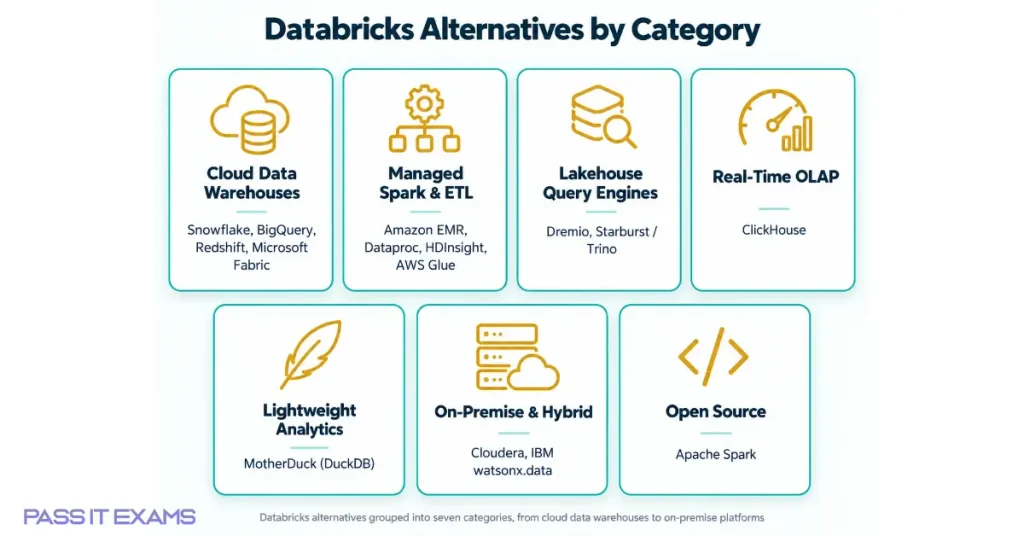
The 15 options below fall into seven categories, from cloud data warehouses to on-premise platforms. Use this table to shortlist, then read the detailed sections.
| # | Tool | Category | Clouds | Open source | Pricing model | Best for |
|---|---|---|---|---|---|---|
| 1 | Snowflake | Cloud data warehouse | AWS, Azure, GCP | No | Credits for compute plus storage | SQL-first analytics and data sharing |
| 2 | Google BigQuery | Cloud data warehouse | GCP | No | Per-query or slot capacity | Serverless SQL on Google Cloud |
| 3 | Amazon Redshift | Cloud data warehouse | AWS | No | Provisioned nodes or serverless RPUs | AWS-centric warehousing |
| 4 | Microsoft Fabric (with Azure Synapse) | Cloud data warehouse / analytics | Azure | No | Capacity units | Microsoft and Power BI shops |
| 5 | Amazon EMR | Managed Spark and ETL | AWS | Runs open-source engines | Instance time or serverless vCPU | Flexible Spark on AWS |
| 6 | Google Cloud Dataproc | Managed Spark and ETL | GCP | Runs open-source engines | vCPU-based premium plus infrastructure | Spark and Hadoop on GCP |
| 7 | Azure HDInsight | Managed Spark and ETL | Azure | Runs open-source engines | Cluster node hours | Legacy Hadoop and Spark on Azure |
| 8 | AWS Glue | Managed Spark and ETL | AWS | No | DPU-hours | Serverless ETL on AWS |
| 9 | Dremio | Lakehouse query engine | Multi-cloud, on-premise | Partly | Subscription and compute | Iceberg-based self-service SQL |
| 10 | Starburst (Trino) and Iceberg + Trino | Lakehouse query engine | Multi-cloud, on-premise | Trino and Iceberg: yes | Subscription, or open source | Federated queries and open stacks |
| 11 | ClickHouse | Real-time OLAP | Multi-cloud, on-premise | Yes (core) | Usage-based cloud, or open source | Low-latency analytics |
| 12 | MotherDuck (DuckDB) | Lightweight analytics | Cloud-hosted | DuckDB: yes | Usage and plan tiers | Small teams, modest data |
| 13 | Cloudera Data Platform | On-premise and hybrid | On-premise, multi-cloud | Built on open-source projects | Subscription | Regulated, hybrid estates |
| 14 | IBM watsonx.data | On-premise and hybrid | On-premise, multi-cloud | Built on open formats | Subscription or usage | Hybrid open lakehouse |
| 15 | Self-managed Apache Spark | Open source | Any, including on-premise | Yes | Free software, you pay infrastructure | Teams with strong platform skills |
Who Are the Main Databricks Competitors?
Databricks competes with cloud data warehouses, managed Spark services, open lakehouse engines, and on-premise platforms. Companies like Databricks fall into four groups, depending on which part of the platform they challenge.
- Cloud data warehouses: Snowflake, Google BigQuery, Amazon Redshift, and Microsoft Fabric.
- Managed Spark and ETL services: Amazon EMR, Google Cloud Dataproc, Azure HDInsight, and AWS Glue.
- Open lakehouse and query engines: Dremio, Starburst, and the Apache Iceberg + Trino stack.
- Specialists and on-premise platforms: ClickHouse, MotherDuck, Cloudera, IBM watsonx.data, and self-managed Apache Spark.
Hyperscaler services compete on integration with their own cloud. Open-source stacks compete on cost and portability. Warehouses compete on simplicity.
Why Are People Leaving Databricks?
Teams usually leave Databricks over cost predictability, operational complexity, workload mismatch, lock-in concerns, or skills gaps. Many teams stay and tune instead. The reasons below are the ones practitioners raise most often.
- DBU cost unpredictability: Databricks bills in Databricks Units (DBUs), and the effective cost depends on workload type, compute tier, and cloud infrastructure. Idle clusters, oversized jobs, and all-purpose compute used for scheduled work can inflate bills. Budgeting is harder than with a flat per-query model.
- Operational complexity: Cluster policies, pools, Unity Catalog setup, networking, and workspace governance take real effort. Small teams often spend more time administering the platform than building pipelines.
- Spark can be overkill for smaller data: Many analytics workloads fit on a single node or a SQL warehouse. Engines like DuckDB or a managed warehouse can finish them faster and with less setup.
- Vendor lock-in concerns: Delta Lake is open source, but features around Unity Catalog, Photon, and proprietary tooling tie workloads to the platform. Teams that want engine choice often move toward Apache Iceberg.
- Skills gap: Spark tuning, partitioning, and cluster sizing are specialist skills. SQL-first teams often prefer a platform their analysts can run without engineering support.
Databricks has genuine strengths: strong Spark performance, mature notebooks, MLflow for experiment tracking, and one platform for engineering and machine learning. Leaving makes sense when your workloads do not use those strengths.
Databricks Pricing Explained: How DBUs Work
Databricks charges for compute in DBUs, a normalized unit of processing per hour, billed per second. The dollar rate per DBU varies by product, tier, cloud, and region, so total cost is never one number.
Several factors set the DBU rate:
- Workload type: jobs compute, all-purpose compute, SQL warehouses, and serverless products carry different rates.
- Plan and cloud: the tier and the cloud provider both change the rate.
- Commitment: contract discounts depend on negotiated usage commitments.
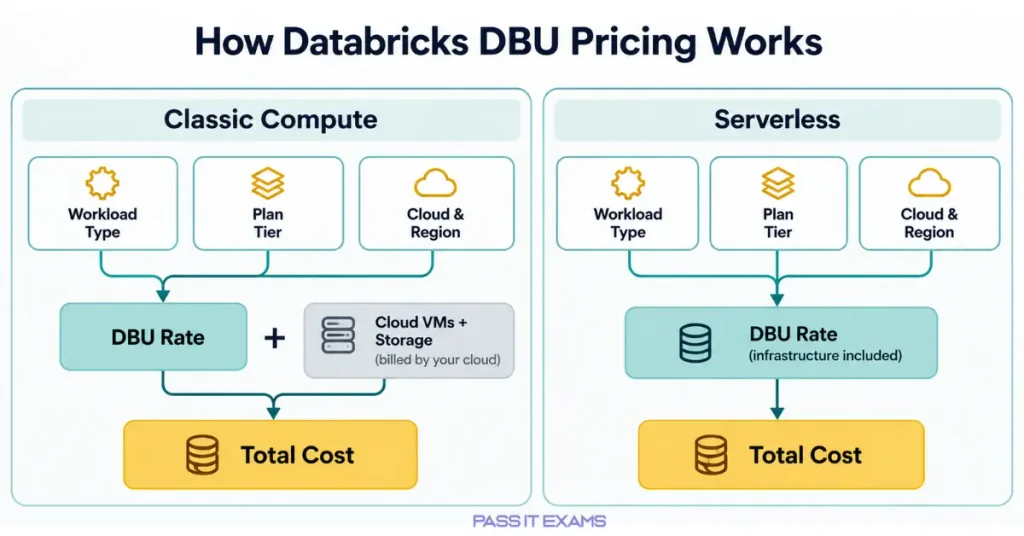
With classic compute, you also pay your cloud provider for the underlying virtual machines and storage. Serverless options bundle infrastructure into the DBU price. That makes comparisons harder, because the two models split costs differently.
Check Databricks’ official pricing page for current details. Treat any third-party price table with caution.
Tip: Before comparing platforms, export 90 days of Databricks usage by workload type and tag. Many teams find that a few all-purpose clusters or oversized jobs drive most spend. Fixing those can change the whole migration business case.
How We Evaluated These Alternatives
We scored each tool on seven criteria that matter in real migrations. The criteria reflect hands-on platform work, not vendor feature checklists.
- Workload fit: SQL analytics, batch ETL, streaming, machine learning, or real-time serving.
- Performance model: serverless, provisioned, or self-managed, and how each scales.
- Pricing transparency: how easily you can forecast and cap spend.
- Ecosystem: BI tools, orchestration, connectors, and community support.
- Open formats: support for Apache Iceberg, Delta Lake, Apache Hudi, and Parquet.
- Governance: catalogs, access control, lineage, and auditing, compared with Unity Catalog.
- Migration effort: how much code, metadata, and process must change.
We rate migration effort as Low, Medium, or High relative to a typical Databricks estate of Spark jobs, Delta tables, and notebooks. Your result depends on how much custom code you have.
Tip: Run a proof of concept on your three slowest and three most expensive workloads. Vendor demos use clean data. Your messy joins and skewed keys reveal the true cost and performance.
Emerging & Specialized Alternatives (2026)
The tools below solve narrower problems than the full platforms listed above. They are not designed to replace Databricks end to end. Instead, they target specific workloads where a lighter or more focused tool can be simpler and more cost-effective.
Tinybird
Tinybird is a managed real-time analytics platform built on ClickHouse. It lets teams ingest streaming data, transform it with SQL, and publish results as low-latency APIs. It is designed for product teams that need analytics inside applications rather than in notebooks or BI tools.
Best for: Real-time analytics and product-facing APIs (in-app dashboards, usage metrics, event-driven features).
Limitation: Not built for large-scale machine learning, complex multi-stage data pipelines, or broad data science workflows.
MotherDuck
MotherDuck is a managed service built on DuckDB. It is worth a brief second look here because it fits a specific pattern: fast, SQL-based analytics on small to mid-sized datasets without cluster management.
Best for: Small teams, analysts, and embedded analytics use cases where data volumes are modest and simplicity matters more than scale.
Limitation: It is not designed for petabyte-scale processing or heavy distributed workloads.
e6data
e6data is a query engine that runs directly on open table formats such as Apache Iceberg, Delta Lake, and Hudi. It works with data already stored in your cloud storage and focuses on query speed and cost efficiency for SQL workloads.
Best for: Teams with an existing lakehouse that want faster or cheaper SQL queries without moving data or changing storage formats.
Limitation: It is a query engine, not a full platform. You will still need separate tools for ingestion, orchestration, notebooks, and machine learning.
All-in-One Platforms (Definite, BEEM)
Platforms such as Definite and BEEM bundle ingestion, a warehouse, and BI into a single product. They reduce the number of tools a small team has to set up and maintain.
Best for: Startups and small data teams that want working analytics quickly without assembling a full data stack.
Limitation: They are less flexible than modular stacks and may not meet the governance, scale, or customization needs of larger organizations.
These tools are not full Databricks replacements for most enterprises, but they can be excellent fits for specific workloads.
Databricks Alternatives by Cloud
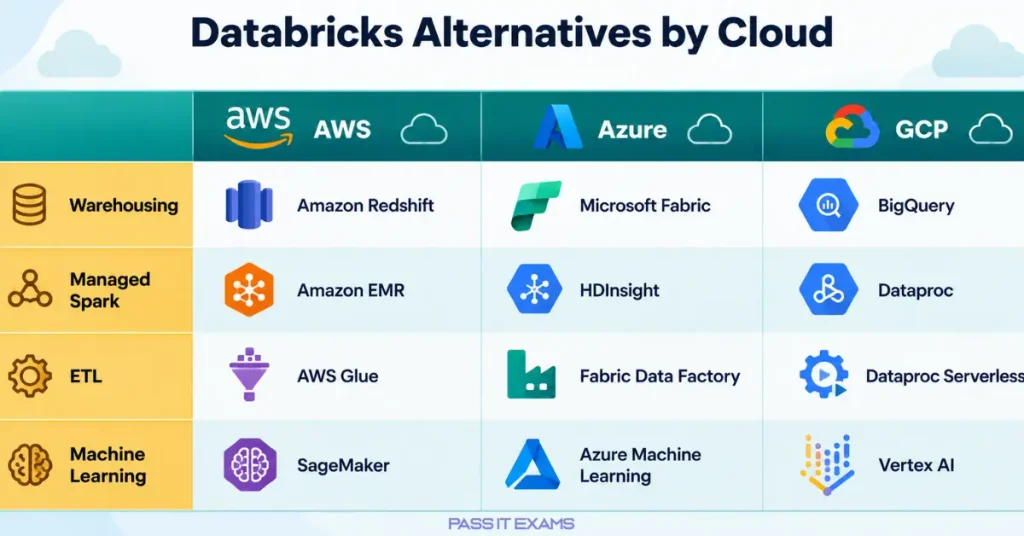
Each major cloud offers native services that cover parts of Databricks, but none replaces it with a single product. Databricks runs on all three clouds, so “alternative” usually means a native stack or a multi-cloud platform.
Databricks Alternatives in AWS
The closest AWS-native combination is Redshift, EMR, and Glue, with Iceberg tables in S3. Redshift handles warehousing, EMR runs flexible Spark, and Glue provides serverless ETL and the Data Catalog.
| Need | AWS option |
|---|---|
| SQL warehousing | Amazon Redshift |
| Managed Spark with control | Amazon EMR |
| Serverless ETL and catalog | AWS Glue |
| Machine learning | Amazon SageMaker |
Snowflake also runs on AWS and competes directly with Redshift. The trade-off is operational effort: you assemble and govern several services instead of one platform.
Databricks Alternatives in Azure
Microsoft Fabric is the main Azure alternative, and Azure Synapse Analytics and HDInsight fill specific roles. These are Azure Databricks alternatives, and Azure Databricks itself is a first-party Azure service.
- Microsoft Fabric: unified analytics with Power BI and OneLake.
- Azure Synapse Analytics: the predecessor platform. Plan around Microsoft’s current guidance.
- Azure HDInsight: managed open-source clusters for legacy Hadoop and Spark.
Fabric suits teams already invested in Microsoft tooling. Snowflake on Azure is a common third-party choice for SQL-first teams.
Databricks Alternatives in GCP
BigQuery is the main Databricks alternative on GCP, with Dataproc covering managed Spark. BigQuery handles serverless SQL, ML through BigQuery ML, and Iceberg tables. Dataproc covers Spark and Hadoop jobs.
Vertex AI adds machine learning tooling. The result approximates a lakehouse, but without one unified product. Teams gain simplicity for SQL and lose some of the integrated Spark experience.
Tip: Compare network egress costs when mixing clouds. Moving data between a Databricks workspace in one cloud and a warehouse in another can add cost that never appears in a vendor comparison.
Free and Open-Source Databricks Alternatives
Free Databricks alternatives exist, but “free” means no license fee, not no cost. You still pay for compute, storage, and the engineers who run them. The strongest open-source options are below.
- Apache Spark: the same engine at the core of Databricks, free to self-host.
- Apache Iceberg + Trino: open tables with a distributed SQL engine.
- Delta Lake and Apache Hudi: open table formats that add ACID transactions to data lakes. Hudi suits upsert-heavy and incremental workloads.
- DuckDB: an embedded analytical database for single-node analytics.
- ClickHouse (open source): a columnar OLAP database for fast aggregations.
The best Databricks open source alternative is a stack, not a product. A typical build pairs Spark, Iceberg or Delta Lake, Trino, a catalog, and an orchestrator. No single project replicates Databricks’ managed experience.
What Are the Alternatives to Apache Spark?
The best alternatives to Apache Spark depend on whether you need batch, streaming, or interactive SQL. Spark is versatile, but other engines win in specific cases.
| Alternative | Best for |
|---|---|
| Trino | Interactive and federated SQL |
| Apache Flink | Stateful stream processing |
| DuckDB | Single-node analytics on files |
| Polars | Fast DataFrame work on one machine |
| Dask and Ray | Distributed Python workloads |
| Apache Beam | Portable batch and streaming pipelines |
If your data fits on one machine, a single-node engine often beats Spark on speed and simplicity. Spark remains the safer choice for large distributed batch processing.
On-Premise Databricks Alternatives
The best on-premise Databricks alternatives are Cloudera Data Platform, IBM watsonx.data, and self-hosted Apache Spark on Kubernetes. Databricks is a cloud-based platform, so teams needing data on their own infrastructure must look elsewhere.
On-premise requirements usually come from three sources:
- Data sovereignty: laws that require data to stay in a country or facility.
- Compliance: sector rules in finance, healthcare, and government.
- Latency and cost: large, steady workloads near existing data centers.
Cloudera suits large regulated estates with built-in governance. IBM watsonx.data suits IBM-centered hybrid setups. Self-hosted Spark on Kubernetes suits teams with platform skills who want maximum control. Dremio and Trino also offer self-managed deployments.
Expect to own hardware, upgrades, and security.
Databricks Genie Alternatives
Databricks Genie is a natural-language interface in Databricks AI/BI that lets users ask questions of governed data in plain English. It generates SQL against curated datasets. Several tools offer comparable conversational analytics.
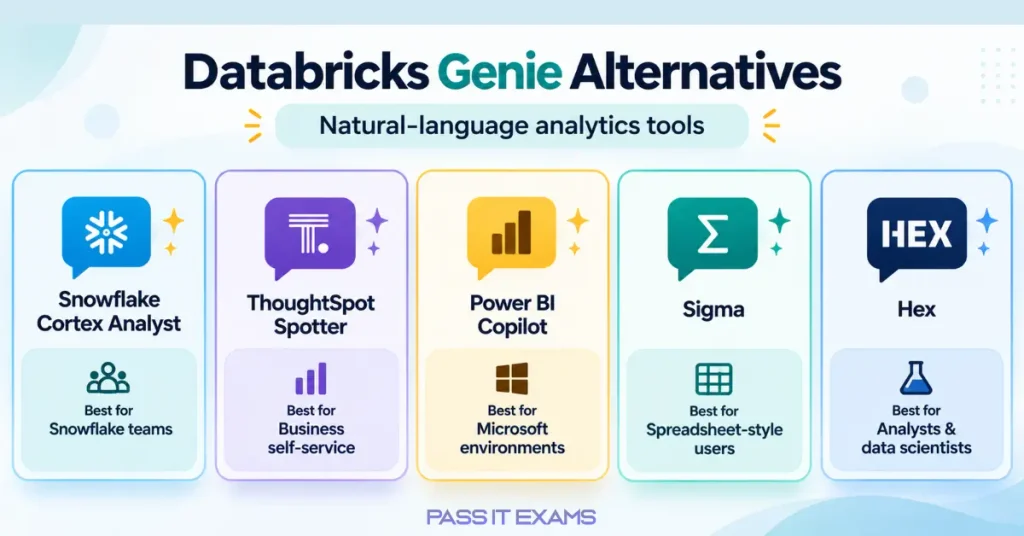
| Tool | What it does | Best for |
|---|---|---|
| Snowflake Cortex Analyst | Natural-language questions over Snowflake data using a semantic model | Teams already on Snowflake |
| ThoughtSpot Spotter | AI analyst for search-driven analytics across warehouses | Self-service analytics for business users |
| Power BI Copilot | Conversational help inside Power BI reports and models | Microsoft and Fabric environments |
| Sigma | Spreadsheet-style interface on the warehouse, with AI assistance | Business teams who think in spreadsheets |
| Hex | Collaborative notebooks with AI-assisted analysis | Analysts and data scientists |
Accuracy depends less on the tool than on your semantic layer. Clear metric definitions, curated tables, and documented joins matter most.
Databricks vs Snowflake
Databricks is generally stronger for Spark-based data engineering and machine learning, while Snowflake is generally stronger for SQL-first analytics and ease of use. Both have expanded into each other’s territory, so overlap keeps growing.
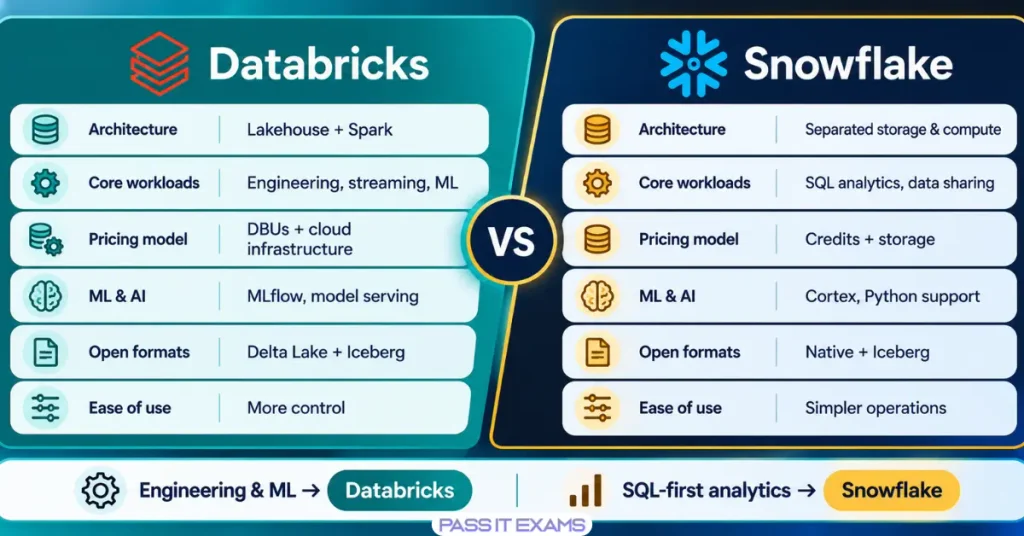
| Dimension | Databricks | Snowflake |
|---|---|---|
| Architecture | Lakehouse on open storage, with Apache Spark and Photon | Cloud data platform separating storage and compute |
| Core workloads | Data engineering, streaming, ML | SQL analytics, data sharing, applications |
| Pricing model | DBUs plus cloud infrastructure (classic) | Credits for compute, plus storage |
| ML and AI | MLflow, notebooks, model serving | Cortex features and Python support |
| Open formats | Delta Lake, with Iceberg interoperability | Native tables, plus Apache Iceberg support |
| Ease of use | More configuration, more flexibility | Simpler operations, less low-level control |
Verdict: Choose Databricks if engineering and ML dominate your workload. Choose Snowflake if analysts and SQL dominate and you want low administration. Run both against your own queries before deciding.
Databricks vs BigQuery
Databricks offers more control over Spark and ML pipelines, while BigQuery offers a simpler serverless model on Google Cloud. BigQuery removes cluster decisions, while Databricks rewards teams that tune them.
| Dimension | Databricks | BigQuery |
|---|---|---|
| Architecture | Lakehouse with managed Spark clusters and SQL warehouses | Serverless data warehouse |
| Core workloads | Data engineering, streaming, ML | SQL analytics, BI, ML through BigQuery ML |
| Pricing model | DBUs plus cloud infrastructure (classic) | Per data scanned or reserved slots, plus storage |
| ML and AI | MLflow, notebooks, model serving | BigQuery ML and Vertex AI |
| Open formats | Delta Lake, with Iceberg interoperability | Native storage, plus Iceberg tables |
| Ease of use | More setup and tuning | Minimal infrastructure management |
| Clouds | AWS, Azure, GCP | GCP |
Verdict: Choose BigQuery for serverless SQL on Google Cloud. Choose Databricks for multi-cloud flexibility or heavy Spark and ML work.
Databricks Competitors According to Gartner
Searches for databricks competitors gartner lead to the Gartner Magic Quadrant for Cloud Database Management Systems, which covers Databricks and its main rivals. The 2025 edition, published in November 2025, evaluated 20 vendors on ability to execute and completeness of vision.
According to vendor announcements of that report, AWS, Databricks, Google, and IBM were each named Leaders. Databricks states it was named a Leader for the fifth consecutive year. The full list of Leaders and every other placement appears in the report itself.
The report matters to buyers for three reasons:
- Broad scope: it spans the cloud database market, so hyperscalers and lakehouse platforms appear in one evaluation.
- Shortlisting: it gives procurement and leadership teams a shared reference when building a vendor list.
- Limits: Gartner does not endorse any vendor and advises against choosing only the highest-rated ones. A Leader placement reflects overall market position, not fit for your workload.
Gartner updates the report annually, so check for the newest edition before citing it in a business case. Then validate your shortlist with a proof of concept on your own data.
What Are the Top 5 Data Warehouses?
The top five data warehouses for most teams are Snowflake, BigQuery, Redshift, Microsoft Fabric, and ClickHouse. The order below is not a ranking. Fit depends on your cloud and workload.
- Snowflake: the strongest multi-cloud option for SQL-first analytics and data sharing.
- Google BigQuery: the simplest serverless warehouse for teams on Google Cloud.
- Amazon Redshift: the natural choice for warehousing inside AWS.
- Microsoft Fabric (with Azure Synapse): the best fit for Microsoft and Power BI environments.
- ClickHouse: the leading pick for real-time and high-volume analytical queries, with open-source and managed options.
How to Choose the Right Databricks Alternative
Match the alternative to your dominant workload, your cloud, and your team’s skills. Use this matrix as a starting point.
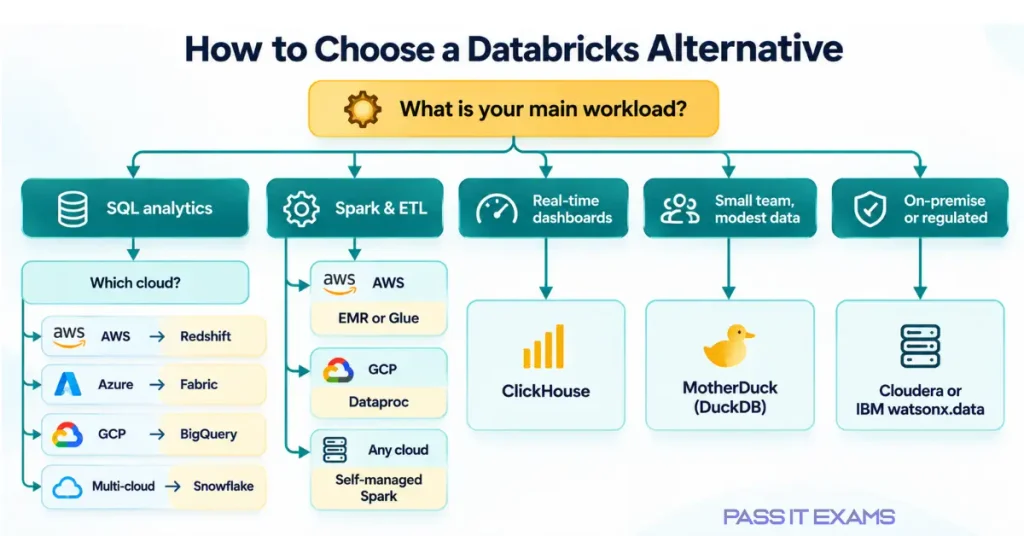
| If you need… | Choose… |
|---|---|
| SQL-first analytics, minimal administration | Snowflake |
| Serverless analytics on Google Cloud | BigQuery |
| Warehousing inside AWS | Amazon Redshift |
| Microsoft and Power BI integration | Microsoft Fabric |
| Managed Spark with cost control on AWS | Amazon EMR or AWS Glue |
| Managed Spark on Google Cloud | Dataproc |
| Open-format, federated SQL | Trino (Starburst or open stack) or Dremio |
| Real-time dashboards | ClickHouse |
| Small team, modest data | MotherDuck (DuckDB) |
| On-premise or hybrid for regulated data | Cloudera or IBM watsonx.data |
| Maximum control, no license fees | Self-managed Apache Spark on Kubernetes |
Tip: Decide your table format first. If you standardize on Apache Iceberg, you keep engine choice open and make any future migration far easier.
Migrating Off Databricks: What to Plan For
A Databricks migration succeeds when you plan table formats, jobs, governance, models, and cost testing before moving any data. The technical move is rarely the hardest part. Rebuilding operating habits is.

- Delta Lake to Apache Iceberg: Databricks offers Delta UniForm, which exposes Delta tables to Iceberg readers. Confirm current support and limits in Databricks’ documentation. Conversion is also possible, but test file layouts, partitioning, and time travel behavior.
- Notebooks and jobs: Notebooks mix code, parameters, and orchestration. Extract logic into tested modules, then map Databricks Workflows to your target orchestrator. Spark SQL usually ports with minor changes, but Databricks-specific utilities do not.
- Unity Catalog governance: Inventory permissions, row filters, column masks, and lineage before moving. Rebuild them in the target catalog and audit the result. Governance gaps cause the most security surprises.
- MLflow models: MLflow is open source, so tracking and model artifacts can often move. Model serving, feature tables, and registry workflows need replacement on the target platform.
- Cost testing: Run production-like workloads on the new platform for at least one full billing cycle. Include egress, storage, and staffing.
Tip: Migrate in thin slices, starting with one low-risk domain. Run old and new pipelines in parallel and compare outputs row by row before you cut over.
When You Should Stay on Databricks
Stay on Databricks when you run large-scale Spark, need unified data engineering and ML, or have invested heavily in the platform. Switching has real costs, and Databricks has real strengths.
- Large-scale Spark workloads: Databricks’ optimized Spark runtime and Photon engine suit big batch and streaming jobs.
- Unified ML and data engineering: MLflow, notebooks, and model serving sit beside pipelines on one platform.
- Heavy existing investment: Many jobs, Delta tables, and Unity Catalog policies make migration costly.
- Governance maturity: Unity Catalog gives a single governance layer across data and AI assets.
Often the better first step is cost optimization. Right-size clusters, move scheduled work to jobs compute, and enforce cluster policies before deciding to leave.
Frequently Asked Questions FAQ’s
What is the best Databricks alternative?
There is no single best Databricks alternative. Snowflake suits SQL-first analytics, BigQuery suits serverless analytics on Google Cloud, and Microsoft Fabric suits Microsoft-centric teams. Self-managed Apache Spark or Amazon EMR suit teams that want Spark without DBU pricing. Match the tool to your dominant workload.
Is there a free alternative to Databricks?
Yes, but free means no license fee, not no cost. Apache Spark, Trino with Apache Iceberg, DuckDB, and ClickHouse open source are all free to download. You still pay for compute, storage, and the engineers who operate them. Managed free tiers exist on some services, but they vary.
What is the open-source alternative to Databricks?
The closest open-source alternative is a stack: Apache Spark for processing, Apache Iceberg or Delta Lake for tables, Trino for SQL queries, and a catalog and orchestrator of your choice. No single project replicates Databricks’ managed experience. Expect to assemble and operate the pieces yourself.
Is Snowflake better than Databricks?
Neither is universally better. Snowflake is generally easier for SQL-first analytics and governed data sharing. Databricks is generally stronger for large-scale Apache Spark, data engineering, and machine learning. Both have added features in each other’s territory, so test your own workloads before deciding.
What is the Azure alternative to Databricks?
Microsoft Fabric is the main Azure-native alternative, with Azure Synapse Analytics as its predecessor and Azure HDInsight for managed open-source clusters. Snowflake on Azure is a strong third-party option. Azure Databricks itself is a first-party Azure service, so these are alternatives, not replacements within it.
What is the AWS equivalent of Databricks?
No single AWS service matches Databricks. Amazon EMR and AWS Glue cover Apache Spark processing, Amazon Redshift covers warehousing, and Amazon SageMaker covers machine learning. Teams combine them with Apache Iceberg tables and the AWS Glue Data Catalog for a lakehouse-style setup.
What is the GCP equivalent of Databricks?
BigQuery is the closest GCP equivalent for analytics, and Google Cloud Dataproc covers managed Apache Spark. BigQuery supports Apache Iceberg tables and Spark procedures, and Vertex AI handles machine learning. Together they approximate a lakehouse without a single unified product.
What is cheaper than Databricks?
It depends on workload. Self-managed Apache Spark and Trino avoid license fees but add operations cost. BigQuery on-demand and DuckDB-based tools can cost less for small or bursty analytics. Run a proof of concept with your own data, because no tool is cheaper in every case.
Final Thoughts
The best Databricks alternatives each win in a specific scenario, and none replaces Databricks everywhere. Warehouses win on simplicity, managed Spark services win on control, open stacks win on portability, and on-premise platforms win on sovereignty. Databricks still leads for large Spark and unified ML work.
A practical next step: pick your three most expensive workloads, run them on two shortlisted alternatives, and compare cost, runtime, and operating effort side by side.
