
Introduction: What is CompTIA A+ and Why It Matters
The CompTIA A+ Core 1 (V15) exam (exam code 220-1201) is the latest version of the industry-standard entry-level IT certification. Released on March 25, 2025, A+ Core 1 focuses on essential hardware, networking, virtualization, and troubleshooting skills used daily by IT professionals in technical support, help desk, and field service roles.
As part of the two-exam A+ credential (Core 1 and Core 2), this certification validates your ability to install, configure, troubleshoot, and maintain devices—a foundation for every tech career. It prepares candidates for positions in organizations of all sizes, from small businesses to large enterprises, while serving as a gateway to advanced CompTIA certifications like Network+ and Security+.
Quick Facts & Exam Details
| Detail | Information |
| Exam Name | CompTIA A+ Core 1 (V15) |
| Exam Code | 220-1201 |
| Provider | CompTIA |
| Launch Date | March 25, 2025 |
| Version | V15 |
| Prerequisites | None formally required; 9–12 months of hands-on experience in IT support or lab environments recommended |
| Passing Score | 675 on a scale of 100–900 |
| Exam Duration | 90 minutes |
| Number of Questions | Up to 90 per exam |
| Question Types | Multiple-choice (single/multiple response), drag-and-drop, and performance-based (PBQs) |
| Exam Cost | $246 USD (Note: Prices vary by country and are subject to change; verify during registration) |
| Languages | English (additional languages to be released post-launch) |
| Retirement Estimate | 2028 (3 years after launch) |
| Delivery Method | Pearson VUE testing center or online proctoring |
Is This Certification Right for You? (Target Audience)
The CompTIA A+ certification is ideal if you are:
- Starting your IT career path as a support technician, field service tech, or help desk specialist.
- Interested in building core skills in hardware, operating systems, networking, and troubleshooting before moving to higher-level certifications.
- An experienced IT support professional seeking formal credentialing to validate existing skills.
Common job titles for A+ certified professionals include:
- Help Desk Technician
- IT Support Specialist
- Field Service Technician
- Technical Support Representative
- Endpoint Support Specialist
Exam Blueprint: Skills You’ll Be Tested On
The A+ Core 1 (V15) exam measures your knowledge across five domains, updated to reflect modern hardware and support technologies.
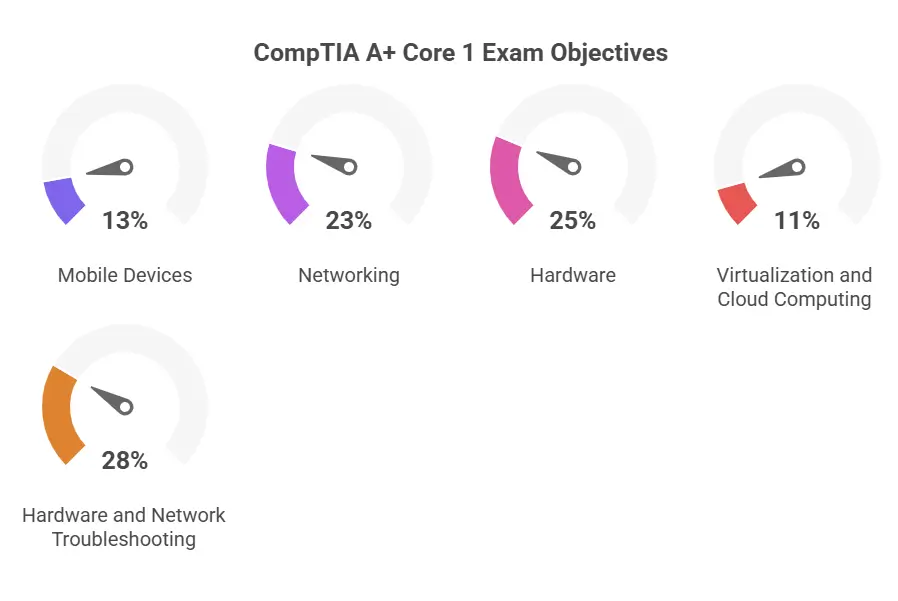
| Domain | Weight | Key Topics |
| 1. Mobile Devices | 13% | Installation and configuration of laptops, tablets, smartphones, and other mobile hardware. Includes synchronization settings, hardware replacement (batteries, displays), and network connectivity troubleshooting. |
| 2. Networking | 23% | Understanding network topologies, TCP/IP fundamentals, Wi-Fi setup, cable types, ports, and SOHO network configuration (including VPNs and IP addressing). |
| 3. Hardware | 25% | Installing, configuring, and maintaining PC components like CPUs, memory, motherboards, drives, and power supplies; peripheral connectivity and troubleshooting. |
| 4. Virtualization and Cloud Computing | 11% | Basic virtualization concepts (hypervisors, virtual machines) and cloud services (IaaS, SaaS, PaaS); desktop virtualization and deployment. |
| 5. Hardware and Network Troubleshooting | 28% | Diagnosing and resolving issues related to boot failures, hardware malfunctions, network drops, and peripheral problems using diagnostic tools like multimeters and cable testers. |
This structure ensures broad technical coverage, preparing candidates for both local and remote support roles.
Your Strategic Study Plan for Success
Phase 1: Build Your Foundation
Get familiar with the A+ 220-1201 objectives from CompTIA’s official website. Focus on understanding hardware basics such as:
- Computer components (RAM, CPUs, GPUs, power supplies).
- Common connectors (USB-C, HDMI, RJ-45).
- Basic networking principles: IP addressing, routing, and switching.
Study resources:
- CompTIA CertMaster Learn and official A+ Study Guide.
- Professor Messer’s 220-1201 Course for free structured learning videos.
Phase 2: Master Each Domain
- Hardware: Build or upgrade a PC in a practice lab. Physically install and troubleshoot components.
- Networking: Set up a router, configure wireless networks, and practice troubleshooting IP conflicts.
- Virtualization/Cloud: Experiment with VirtualBox or Hyper-V; explore Google Cloud or AWS free tiers to understand cloud principles.
- Troubleshooting: Learn systematic diagnosis using POST codes, BIOS settings, and event logs.
Hands-on experience is critical—lab practice is the best way to reinforce exam knowledge.
Phase 3: Final Prep and Practice
- Take multiple timed practice exams (such as CrucialExams and CompTIA CertMaster Practice).
- Focus on your weaker domains based on performance metrics.
- Practice performance-based questions (PBQs) to simulate troubleshooting tasks.
- Review CompTIA’s free sample questions and objective checklist.
Career and Salary Opportunities
The CompTIA A+ certification is globally recognized and opens doors to numerous entry-level IT positions.
Common job titles:
- Help Desk Support
- Technical Support Specialist
- Desktop Support Technician
- IT Field Service Technician
Typical U.S. salary ranges (2026):
| Role | Salary Range |
| Help Desk Technician | $45,000 – $60,000 |
| IT Support Specialist | $50,000 – $70,000 |
| Field Service Technician | $48,000 – $65,000 |
| Desktop Support Analyst | $55,000 – $75,000 |
Professional growth pathways include advancing to Network+ (N10-009), Security+ (SY0-701), or specialization areas like Server+ (SK0-005).
Exam Logistics: Policies You Need to Know
- Retake Policy: Retakes require a new voucher; you may retake immediately after a failed attempt.
- Certification Validity: Three years from your certification date.
- Renewal: Renew with 20 CEUs via the CompTIA Continuing Education (CE) program. You can also renew by earning a higher-level certification (e.g., Network+, Security+).
- Testing Partner: Pearson VUE via in-person or online options.
- Mixing Rule: Core 1 and Core 2 exams must be from the same version (V15) for the credential to be valid.
Common Questions and Sticking Points
1. Do I need to pass Core 1 before Core 2?
No. You can take Core 1 (220-1201) and Core 2 (220-1202) in any order, but both must be passed within the same version to earn certification.
2. How is V15 different from V14 (220-1101/1102)?
The new V15 (220-1201) adds updated content on cloud computing, modern mobile device hardware, and virtualization environments, while refining outdated peripheral and port topics.
3. Is hands-on experience required?
Not mandatory but highly beneficial. A+ exams test practical troubleshooting, installation, and maintenance skills typically gained from real IT or lab work.
4. What’s the best way to study for A+ Core 1?
Start with the official CompTIA objectives, use CertMaster Learn or Professor Messer, and practice extensively through simulation labs or real hardware builds.
5. When does the old version (V14, 220-1101) retire?
The English version retired on September 25, 2025, with other languages phased out by December 19, 2025.
Conclusion: Your Next Step
The CompTIA A+ Core 1 (220-1201) V15 certification is the foundation of your IT career in 2026 and beyond. It equips you with critical hands-on skills for troubleshooting, network configuration, and cloud fundamentals—essential stepping stones to advanced certifications.
Start your journey today by visiting the official CompTIA A+ certification page, reviewing the exam objectives, enrolling in CertMaster Learn or Labs, and building your practical experience through labs or internships.
Once you pass both Core 1 and Core 2 exams, you’ll hold one of the most respected entry-level IT certifications in the world—your gateway into a thriving technology career.
