
Your Complete MS-102 Snapshot
MS-102 is the Microsoft exam for the Microsoft 365 Certified: Administrator Expert certification. In 2026, it covers four domains: Administer Microsoft 365 (40–45%), Manage Microsoft 365 users and groups (35–40%), Manage licenses, support, and service health (10–15%), and Plan and implement Microsoft 365 on-premises, hybrid, and cloud-only (5–10%). A passing score of 700 on a scale of 100-1000 is required. Pricing is typically $165 USD but varies based on the exam’s proctoring location. A typical preparation window is 6–12 weeks, depending on your background with the Microsoft 365 ecosystem. The recommended study path combines the official Microsoft learning materials with extensive, mandatory hands-on labs in a Microsoft 365 developer tenant and full-length practice exams. The certification must be renewed annually via a free online assessment. This guide details official resources, including the study guide, scheduling pages, and exam policies.
Introduction: What is the MS-102 and Why Does It Matter?
The Microsoft 365 Certified: Administrator Expert, earned by passing the MS-102 exam, is the premier credential for professionals who manage the entire Microsoft 365 ecosystem. This certification is the gold standard for those who deploy, manage, and secure the cloud services that power the modern workplace. It proves you have the skills to administer the full suite of Microsoft 365 services, from managing tenant-level settings to overseeing user identities, security, and compliance.
This certification solves the critical business need for a central, expert administrator who can manage a complex, integrated, and ever-evolving cloud platform. The Microsoft 365 Administrator is the key figure responsible for ensuring that an organization’s productivity tools are configured optimally, securely, and efficiently. Earning the MS-102 demonstrates that you are an expert in the control panel of modern business, capable of managing the infrastructure that enables collaboration and productivity while safeguarding corporate data.
Quick Facts & Exam Details
| Detail | Information |
| Exam Name | MS-102: Microsoft 365 Administrator |
| Provider | Microsoft |
| Prerequisites | None. However, candidates are expected to have a strong working knowledge of Microsoft 365 workloads and on-premises administration. |
| Passing Score | 700 on a scale of 100-1000. |
| Exam Duration | Approximately 120 minutes. |
| Question Types | Multiple-choice, multi-select, case studies, and scenario-based questions. |
| Exam Cost | $165 USD. Note: Prices vary by country and are subject to change. Always confirm the final cost during the registration process. |
Is This Certification Right for You? (Target Audience)
The MS-102 is designed for IT professionals who are taking on the role of a Microsoft 365 Administrator. This certification is for you if your responsibilities include:
- Evaluating, planning, migrating, deploying, and managing Microsoft 365 services.
- Administering the Microsoft 365 tenant, including identity, security, compliance, and supporting technologies.
- Serving as the central point of administration for a cloud or hybrid enterprise environment.
If you are the person responsible for the health, security, and efficiency of your organization’s Microsoft 365 services, this certification is designed to validate your expertise.
Exam Blueprint: Skills You’ll Be Tested On
The MS-102 exam tests your practical skills across four key domains of Microsoft 365 administration. Always check the official Microsoft exam page for the latest skills outline.
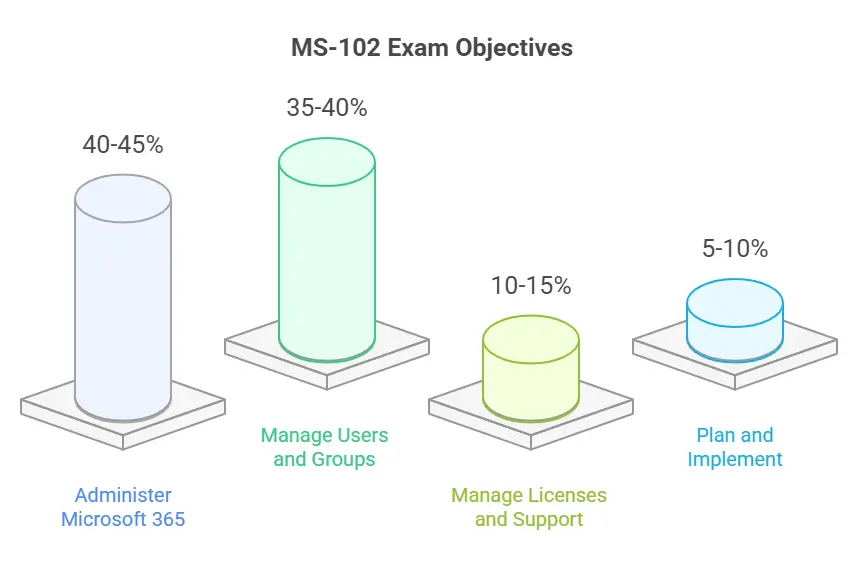
- Administer Microsoft 365 (40–45%)
As the most heavily weighted domain, this is the core of the exam. It covers managing the Microsoft 365 tenant, configuring domains, managing tenant health and services, and understanding the different roles and permissions within the ecosystem. You’ll also be tested on your ability to manage subscription and tenant lifecycles. - Manage Microsoft 365 users and groups (35–40%)
This domain focuses on the people who use the services. You must demonstrate your ability to manage user accounts and licenses, handle password policies, and create and manage various types of groups, including Microsoft 365 Groups and distribution lists. - Manage licenses, support, and service health (10–15%)
Here, you’ll prove your skills in the day-to-day operational management of the tenant. This includes allocating and managing licenses, monitoring service health through the admin center, and understanding how to submit and manage service requests with Microsoft. - Plan and implement Microsoft 365 on-premises, hybrid, and cloud-only (5–10%)
This section covers the strategic aspects of identity and access. It tests your knowledge of identity synchronization using Microsoft Entra Connect Cloud Sync and Connect Sync, and understanding the requirements for a seamless hybrid environment.
Your Strategic Study Plan for Success
Success on the MS-102 is impossible without extensive, hands-on experience in the Microsoft 365 admin center.
- Phase 1: Build the Foundation (Weeks 1-2)
- Get a Lab Environment: This is the most critical first step. Sign up for the Microsoft 365 Developer Program. This gives you a free, renewable E5 developer tenant with all the premium licenses you need to practice every topic on the exam.
- Start with Microsoft Learn: Your primary resource is the official MS-102 learning path on Microsoft Learn. Work through these modules to build your foundational knowledge and understand the scope of the exam.
- Phase 2: Deep Dive with Mandatory Labs (Weeks 3-8)
- Live in the Admin Centers: As you learn a concept, immediately implement it in your developer tenant. Don’t just read about custom domains—add and verify one. Don’t just read about roles—create a custom role and assign it to a test user.
- Master the Core Tasks:
- User and Group Management: Practice the full lifecycle: create users, assign licenses, reset passwords, and add them to different types of groups.
- Identity Sync: If possible, set up a local domain controller on a VM and practice configuring Microsoft Entra Connect to synchronize identities to your developer tenant.
- Service Health: Familiarize yourself with the Service Health Dashboard. Learn how to interpret service advisories and create notifications.
- Phase 3: Final Prep with Practice Exams (Weeks 9-10)
- Use High-Quality Practice Tests: Take the official Microsoft Practice Test for MS-102. This will familiarize you with the complex, scenario-based questions that test your decision-making skills.
- Analyze and Remediate: For every question you get wrong, go back to your lab and the documentation. The goal is to understand why a particular setting or configuration was the correct solution for that scenario.
- Review the Exam Guide: In the final week, reread the official skills outline on the exam page to ensure you are comfortable with every topic.
Career and Salary Opportunities
The Microsoft 365 Administrator is a central and vital role in any modern IT department.
- Market Demand: With the vast majority of enterprises using Microsoft 365, the demand for skilled administrators who can manage this complex platform is consistently high. This certification makes you a prime candidate for roles like Microsoft 365 Administrator, Systems Administrator, and Cloud Engineer.
- Salary Expectations: A certification that validates these in-demand skills leads to a strong salary.
- According to ZipRecruiter, the average annual salary for a Microsoft 365 Administrator in the United States is approximately 100,534, with many roles ranging from 83,000 to $115,500.
- Glassdoor reports a similar figure, with an estimated total pay of around $103,968 per year for a Microsoft 365 Administrator.
Exam Logistics: Policies You Need to Know
- Retake Policy: If you do not pass on your first attempt, you must wait 24 hours before retaking it. For all subsequent attempts, a 14-day waiting period is imposed. You may not take the same exam more than five times in 12 months. You can review the official exam retake policy on Microsoft Learn.
- Certification Validity: The Microsoft 365 Certified: Administrator Expert certification is valid for one year.
- Renewal Process: You must renew your certification annually by passing a free, online, unproctored renewal assessment on Microsoft Learn. This assessment is shorter and focuses on recent updates to the technology.
- Scheduling: You can schedule your exam to be taken at a testing center or online via the official Microsoft certification website.
Practical FAQs & Common Challenges
- How much hands-on experience is truly necessary for this exam?
A significant amount is required. This is not a theoretical exam. You must have practical, hands-on experience in the various Microsoft 365 admin centers. The questions are scenario-based and test your ability to apply knowledge to solve real-world administrative problems. - Which exam domains or topics do most candidates find the most challenging?
Candidates often find the identity and hybrid topics to be the most difficult, especially the nuances of Microsoft Entra Connect and Cloud Sync. Understanding the vast array of roles and permissions across the different admin centers and knowing which role to assign for a specific task is another frequently cited challenge. - Should I take a fundamentals exam like MS-900 before attempting this one?
While it’s not an official prerequisite, it is highly recommended if you are new to the Microsoft 365 ecosystem. The MS-900 (Microsoft 365 Fundamentals) provides the foundational vocabulary and a broad overview of the services, which makes the deep, technical topics in the MS-102 much easier to understand. - How is this different from the MD-102 (Endpoint Administrator) exam?
They are peer certifications focusing on different specialties. The MS-102 is about administering the tenant and its services (users, groups, domains, subscriptions). The MD-102 is about administering the devices (endpoints) that connect to those services, using tools like Microsoft Intune. A complete enterprise administrator often has skills in both areas. - How long should I realistically study for this exam?
For an IT professional with some Microsoft 365 experience, a study period of 6-10 weeks of focused preparation is a realistic timeline. If you are new to the M365 platform, you should plan for a longer period of 3-4 months to build your foundational knowledge. - What are the official prerequisites for this certification?
There are no official, mandatory prerequisites. However, the exam is designed for candidates who are already experienced administrators with a strong working knowledge of the core Microsoft 365 services. - Is it better to focus on practice exams or on hands-on labs?
For the MS-102, hands-on labs are more critical. Your primary focus should be on building muscle memory and practical skills in your developer tenant. Use practice exams in the final phase of your preparation to validate the knowledge you gained in the lab, identify your weak areas, and master your test-taking strategy for the scenario-based questions.
Conclusion: Your Next Step
The MS-102 certification is a powerful credential that proves you have the comprehensive skills to manage a modern, cloud-based productivity environment. In a world where every company relies on these tools, your expertise is more valuable than ever. The path requires a deep commitment to hands-on learning, but the expertise you will gain and the career it will build are well worth the effort.
Your journey to becoming a certified Microsoft 365 Administrator Expert starts now. Take the first step by visiting the official Exam MS-102 page on Microsoft Learn to review the skills outline and begin your journey through the official learning path.
Your goal is to pass the MS-102. Our resources are designed to ensure you do. Access everything you need in one place:
- In-depth study guides to master the content.
- Insightful articles on cloud certifications to broaden your knowledge.
- A full range of Microsoft exam materials to validate your skills.
Start your focused preparation at PassITExams.
