
What SCS-C03 Is All About
SCS-C03 is the AWS Certified Security – Specialty exam. In 2026, it covers 6 domains: Detection (16%), Incident Response (14%), Infrastructure Security (18%), Identity and Access Management (20%), Data Protection (18%), and Security Foundations and Governance (14%). A passing score of 750 on a scale of 100-1000 is required. Pricing is $300 USD (Specialty level). Note: Prices vary by country and are subject to change. Always confirm the final cost during the registration process. A typical preparation window is 8-16 weeks, depending on your security background and AWS experience. The recommended study path combines official AWS learning materials from Skill Builder, consistent hands-on labs in AWS environments, deep study of IAM policies and encryption services, and rigorous practice exams. The certification must be renewed every 3 years by passing the latest version of the exam or completing the online renewal assessment. This guide details official resources, including the exam guide, scheduling pages, and exam policies.
Introduction: What is the AWS Certified Security – Specialty and Why Does It Matter?
The AWS Certified Security – Specialty certification validates your expertise in securing cloud solutions on the Amazon Web Services platform. This credential proves you can design and implement comprehensive security controls, detect and respond to threats, protect data at rest and in transit, manage identity and access at scale, and ensure compliance across complex AWS environments.
For security professionals, this certification demonstrates mastery of AWS-native security services like GuardDuty, Security Hub, Macie, AWS WAF, CloudHSM, KMS, and IAM. It proves you understand how to architect defense-in-depth strategies, respond to security incidents, implement zero-trust principles, and protect sensitive workloads in production cloud environments. For those exploring cloud security career paths, you might also want to understand the cloud security engineer salary landscape.
The certification directly addresses the critical skills gap in cloud security. As organizations migrate sensitive workloads to AWS, they need professionals who can secure multi-account environments, implement automated compliance monitoring, design network segmentation strategies, and respond to sophisticated threats. This specialty certification positions you as a trusted security expert capable of protecting the cloud infrastructure that powers modern business.
Target job roles include Cloud Security Engineer, Cloud Security Architect, Security Consultant, Security Operations Analyst, DevSecOps Engineer, and Compliance Specialist focused on AWS environments.
Quick Facts & Exam Details
| Detail | Information |
| Exam Name | AWS Certified Security – Specialty (SCS-C03) |
| Provider | Amazon Web Services (AWS) |
| Prerequisites | None officially required, but AWS recommends at least 3-5 years of experience securing cloud solutions and 2+ years of hands-on experience securing AWS workloads. Candidates commonly earn AWS Certified Solutions Architect – Associate or AWS Certified Solutions Architect – Professional before attempting this exam. |
| Passing Score | 750 on a scale of 100-1000 |
| Exam Duration | 170 minutes (2 hours 50 minutes) |
| Number of Questions | 65 questions (50 scored, 15 unscored for research) |
| Question Types | Multiple-choice (one correct answer), Multiple-response (two or more correct answers), Ordering (arrange steps in correct sequence), and Matching (pair items correctly) |
| Exam Cost | $300 USD (standard pricing for Specialty-level AWS certifications). Note: Prices vary by country and are subject to change. Always confirm the final cost during the registration process. |
| Testing Options | Pearson VUE testing center or online proctored exam |
| Languages | English, Japanese, Korean, and Simplified Chinese |
Many candidates first earn foundational certifications before attempting specialty exams. Learn more about the AWS Cloud Practitioner certification or explore the AWS Solutions Architect Associate guide.
Is This Certification Right for You? (Target Audience)
Are you responsible for designing and implementing security controls in AWS? Do you work with identity and access management, threat detection, incident response, or compliance in cloud environments? Have you been architecting secure network infrastructures, implementing encryption strategies, or managing multi-account AWS organizations?
This certification is designed for experienced security professionals who perform hands-on security work in AWS production environments. You should have deep experience with IAM policies, understand network security constructs like VPCs and security groups, and be comfortable with AWS security services like CloudTrail, GuardDuty, and KMS.
The ideal candidate has moved beyond basic AWS infrastructure knowledge and now focuses specifically on securing those environments. You might be a security engineer implementing detective controls, a cloud architect designing secure landing zones, a DevSecOps professional embedding security into CI/CD pipelines, or a compliance analyst ensuring regulatory adherence across AWS accounts. If you’re also considering Microsoft Azure security certifications, you might want to compare the Azure Security certification (AZ-500) path.
Exam Blueprint: Skills You’ll Be Tested On
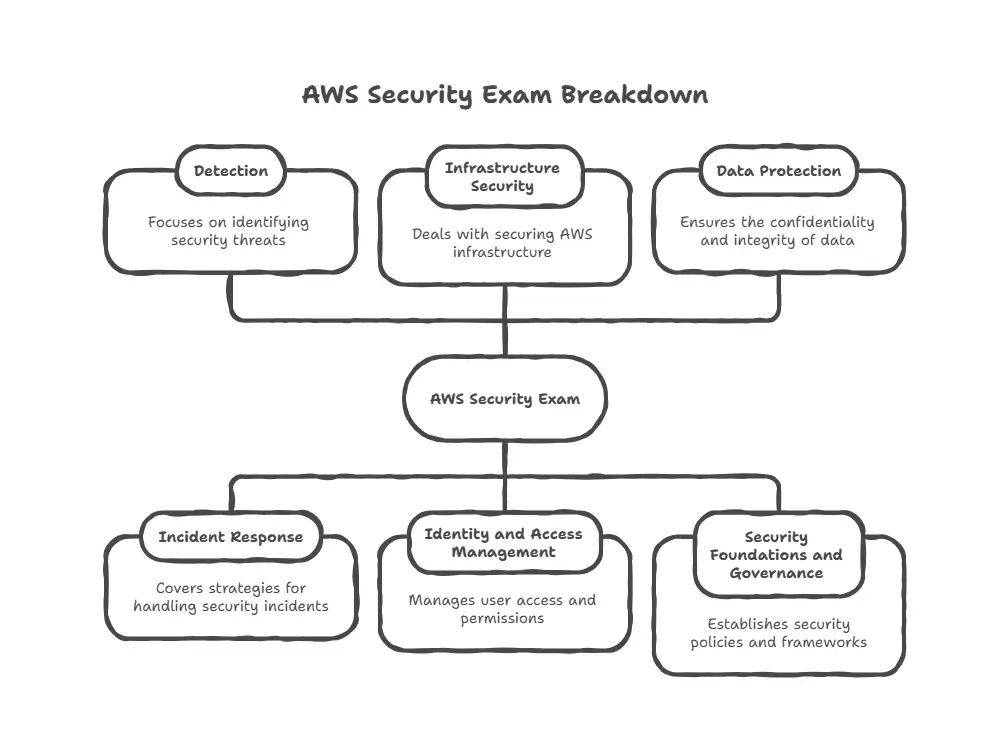
Domain 1: Detection (16% of scored content)
This domain tests your ability to design monitoring and alerting systems, implement comprehensive logging solutions, and troubleshoot security monitoring infrastructure. You’ll need to demonstrate expertise in analyzing workloads to determine monitoring requirements, creating metrics and dashboards using GuardDuty, Security Lake, Security Hub, and Macie, configuring CloudTrail for organizations, implementing log storage with Security Lake, and using CloudWatch Logs Insights, Athena, and OpenSearch for log analysis. You must also understand how to normalize, parse, and correlate logs from VPC Flow Logs, Transit Gateway flow logs, and Route 53 Resolver logs.
Domain 2: Incident Response (14% of scored content)
This domain evaluates your capability to design and test incident response plans, respond to security events, and automate remediation workflows. You’ll be tested on designing response plans using Systems Manager OpsCenter, using AWS service features to prepare for incidents, testing effectiveness with AWS Fault Injection Service and AWS Resilience Hub, capturing forensic artifacts, searching and correlating logs across services, validating findings from AWS security services, implementing network containment controls, and conducting root cause analysis using Amazon Detective.
Domain 3: Infrastructure Security (18% of scored content)
This domain assesses your skills in securing network edge services, compute workloads, and network infrastructure. You must demonstrate knowledge of implementing CloudFront headers, AWS WAF, AWS Shield Advanced, designing edge controls based on geography and rate limiting, hardening EC2 AMIs and container images, scanning for vulnerabilities with Amazon Inspector, deploying patches with Systems Manager Patch Manager, configuring secure administrative access with Session Manager and EC2 Instance Connect, implementing GenAI protections, designing network segmentation with security groups, network ACLs, and AWS Network Firewall, and configuring hybrid connectivity with Site-to-Site VPN and Direct Connect.
Domain 4: Identity and Access Management (20% of scored content)
This is the most heavily weighted domain, covering authentication and authorization strategies. You’ll need to master designing identity solutions using IAM Identity Center, Amazon Cognito, and MFA, configuring temporary credentials with AWS STS and S3 presigned URLs, troubleshooting authentication issues, designing authorization controls with Amazon Verified Permissions, IAM Roles Anywhere, and resource policies, implementing ABAC and RBAC strategies, designing IAM policies following least privilege principles using permission boundaries and session policies, and analyzing authorization failures with IAM Policy Simulator and IAM Access Analyzer.
Domain 5: Data Protection (18% of scored content)
This domain tests your understanding of protecting data in transit and at rest, and managing cryptographic materials. You must know how to design encryption mechanisms for data in transit by configuring ELB security policies and TLS configurations, configuring secure private access with PrivateLink, VPC endpoints, Client VPN, and Verified Access, designing inter-resource encryption for EMR, EKS, and SageMaker, implementing encryption at rest using CloudHSM or KMS, protecting data integrity with S3 Object Lock, Glacier Vault Lock, and versioning, designing lifecycle management for S3 and EFS, configuring secure replication and backups with AWS Backup and DataSync, managing credential rotation with Secrets Manager, and creating encryption keys across single or multiple regions.
Domain 6: Security Foundations and Governance (14% of scored content)
This domain evaluates your ability to centrally manage AWS accounts and implement governance at scale. You’ll be tested on deploying and managing AWS Organizations, implementing and managing AWS Control Tower with custom controls, implementing SCPs, RCPs, and AI service opt-out policies, centralizing security services with delegated administrator accounts, managing root user credentials, using infrastructure as code to deploy resources securely with CloudFormation stack sets and CloudFormation Guard, using tags for resource organization, deploying policies from central sources with Firewall Manager, securely sharing resources with Service Catalog and Resource Access Manager, creating rules to detect non-compliant resources with AWS Config and Security Hub, using AWS Audit Manager and AWS Artifact for evidence collection, and evaluating architecture compliance with the AWS Well-Architected Framework tool.
Your Strategic Study Plan for Success
Phase 1: Foundation Building (Weeks 1-2)
Begin by reviewing the official AWS Certified Security – Specialty Exam Guide thoroughly to understand the exact scope of each domain. If you don’t already hold an Associate-level AWS certification, consider earning the AWS Certified Solutions Architect – Associate first to build foundational AWS knowledge. Enroll in the official AWS Skill Builder Exam Prep Plan for SCS-C03, which provides curated learning paths aligned with exam domains. Review AWS security whitepapers, particularly the AWS Security Best Practices whitepaper, AWS Security Pillar of the Well-Architected Framework, and AWS Security Incident Response Guide. Set up a dedicated AWS account using the Free Tier for hands-on practice throughout your preparation.
Phase 2: Deep Domain Mastery (Weeks 3-10)
Work through each exam domain systematically, spending 1-2 weeks per domain based on complexity and your existing knowledge. For Detection, practice configuring CloudTrail for organizations, creating custom CloudWatch metrics and alarms, enabling GuardDuty and Security Hub, configuring Macie for sensitive data discovery, and implementing Security Lake for centralized log aggregation. For Incident Response, create incident response runbooks in Systems Manager, practice isolating compromised EC2 instances, use Detective to analyze security findings, and configure automated remediation using Lambda and Step Functions.
For Infrastructure Security, build hardened AMIs using EC2 Image Builder, configure AWS WAF rules to protect against OWASP Top 10 threats, implement AWS Shield Advanced protections, design and deploy Network Firewall policies, practice VPC security group and NACL configurations, and implement secure bastion architectures using Systems Manager Session Manager. For Identity and Access Management (the most critical domain), write complex IAM policies from scratch, implement ABAC using tags, configure IAM Identity Center for multi-account access, set up Amazon Cognito user pools and identity pools, practice cross-account role assumptions, and extensively use IAM Policy Simulator and Access Analyzer.
For Data Protection, configure encryption at rest for S3, EBS, RDS, and DynamoDB, implement KMS key policies and grants, practice importing and managing external key material, configure S3 Object Lock and Glacier Vault Lock, implement AWS Certificate Manager and Private Certificate Authority, and configure CloudWatch Logs data protection policies. For Security Foundations and Governance, create multi-account organizations with AWS Organizations, deploy AWS Control Tower landing zones, implement Service Control Policies to restrict actions across accounts, configure AWS Config rules for compliance monitoring, and practice using AWS Audit Manager for audit evidence collection.
Phase 3: Hands-On Practice (Weeks 11-14)
Dedicate significant time to building real-world security scenarios in your AWS account. Design and implement a secure multi-tier application architecture from scratch, configure a complete security monitoring and alerting pipeline, simulate and respond to a security incident end-to-end, implement data encryption and access controls for sensitive information, and build an automated compliance checking and remediation system. Focus heavily on IAM policy troubleshooting scenarios, as this appears frequently on the exam.
Phase 4: Practice Exams and Final Review (Weeks 15-16)
Take the official AWS Certified Security – Specialty Practice Exam to establish your baseline. Use high-quality third-party practice exams from providers like Tutorials Dojo or Whizlabs, completing at least 3-5 full-length practice tests. Review incorrect answers thoroughly, understanding not just why the correct answer is right, but why each incorrect option is wrong. Identify weak domains from your practice exam results and conduct targeted review of those areas. In the final week, review the exam guide one more time, ensure you can explain each skill statement, revisit AWS documentation for services you’re least confident about, and review common IAM policy patterns and KMS key policy structures.
Official Learning Resources:
- AWS Skill Builder Exam Prep Plan: https://skillbuilder.aws/exam-prep/security-specialty
- AWS Training and Certification Page: https://aws.amazon.com/certification/certified-security-specialty/
- Official Exam Guide (PDF): Available from AWS Training and Certification
- AWS Security Blog: https://aws.amazon.com/blogs/security/
- AWS Security Documentation: https://docs.aws.amazon.com/security/
Career and Salary Opportunities
The AWS Certified Security – Specialty credential significantly enhances your earning potential and career prospects in the rapidly growing cloud security field. Security professionals with this certification are in high demand as organizations accelerate their cloud adoption while facing increasingly sophisticated cyber threats.
According to current market data, professionals holding the AWS Certified Security – Specialty certification command competitive salaries. Based on industry surveys and salary data from ZipRecruiter, the average annual salary for AWS Security Specialists in the United States ranges from approximately $78,000 to $132,000, with a national average around $79,000. The typical salary range falls between $53,000 at the 25th percentile and $99,500 at the 75th percentile, with top earners (90th percentile) making approximately $115,000 annually.
According to Glassdoor data, Security Engineers with AWS skills earn between $84,000 and $158,000 annually, with an average base salary of approximately $113,000. When considering total compensation including bonuses, stock options, and other benefits, AWS security professionals can expect salaries ranging from $127,000 to $155,000 or more depending on experience and location.
The IT Skills and Salary survey reports that globally, professionals holding the AWS Certified Security – Specialty certification earn an average of $158,594 annually, placing it among the top-paying AWS certifications. Salary varies significantly based on geographic location, with major tech hubs offering premium compensation. For example, security engineers in Santa Clara, California earn an average of $148,000, while those in Massachusetts average around $128,000.
Job roles accessible with this certification include Cloud Security Engineer, Cloud Security Architect, AWS Security Consultant, Security Operations Analyst, DevSecOps Engineer, Compliance Engineer, and Security Engineering Manager. The certification is particularly valuable for professionals transitioning from traditional on-premises security roles to cloud-focused positions or those looking to specialize in AWS security from general cloud roles.
The skills validated by this certification are increasingly critical as organizations face regulatory requirements like GDPR, HIPAA, PCI-DSS, and SOC 2, all of which require robust cloud security controls. Companies across industries including financial services, healthcare, technology, government, and e-commerce actively seek AWS security specialists to protect their cloud infrastructure and sensitive data.
Exam Logistics: Policies You Need to Know
If you do not pass the exam on your first attempt, you must wait 14 calendar days before you can retake it. There is no limit on the total number of exam attempts, but you must pay the full registration fee of $300 for each attempt. Once you pass the exam, you cannot retake the same exam for two years. However, if AWS releases a new version of the exam with an updated exam guide and new series code, you become eligible to take that new version.
Certification Validity and Renewal:
Your AWS Certified Security – Specialty certification is valid for three years from the date you pass the exam. Before your certification expires, you can recertify by passing the latest version of the exam or by completing a free, online renewal assessment through AWS Certification. This renewal assessment is shorter than the full exam and focuses on recent updates to AWS services and security best practices. It’s in your best interest to stay current with AWS service updates and renew your certification before expiration to maintain your credential status.
Once you earn any AWS certification, you receive a voucher for 50% off your next AWS certification exam. This discount can be particularly valuable if you plan to pursue additional AWS certifications, reducing the cost from $300 to $150 for your next Specialty or Professional-level exam.
To register for the exam, visit the AWS Certification website at https://aws.amazon.com/certification/ and sign in to your AWS Certification Account. Click “Schedule New Exam,” select the AWS Certified Security – Specialty (SCS-C03) exam, and follow the prompts to schedule through Pearson VUE. You can choose to take the exam at a physical Pearson VUE testing center or as an online proctored exam from your home or office.
Cancellation and Rescheduling:
You can cancel or reschedule your exam up to 24 hours before your scheduled appointment without penalty. After the 24-hour window, you cannot cancel or reschedule, and if you miss your appointment, you will forfeit the exam fee. To reschedule, go to your AWS Certification Account, click “Manage Pearson VUE exams,” and select the appointment you wish to modify.
Receiving Your Results:
You will not see your pass/fail result immediately at the end of the exam. Results are typically available within five business days. You’ll receive an email notification when your exam results are posted to your AWS Certification Account under “Exam History.” Your score report will show your scaled score and performance in each domain section.
Practical FAQs & Common Challenges
1. How much hands-on experience is truly necessary before taking this exam?
While AWS recommends at least two years of hands-on experience securing AWS workloads, the reality is that the depth of your experience matters more than the duration. You need practical, real-world experience working with IAM policies, security groups, encryption services, and security monitoring tools. Simply watching videos or reading documentation isn’t sufficient. You should have personally configured CloudTrail for audit logging, created and troubleshot complex IAM policies, implemented encryption using KMS, and worked with services like GuardDuty or Security Hub in production or near-production environments. If you’re relatively new to AWS security, I recommend working on security-related projects in your current role or building comprehensive security implementations in a personal AWS account before attempting the exam.
2. Which exam domains or topics do most candidates find the most challenging?
Identity and Access Management consistently emerges as the most challenging domain, particularly the intricate details of IAM policy evaluation logic, permission boundaries, service control policies, and session policies. Understanding how AWS evaluates multiple policy types simultaneously and determines the effective permissions requires deep study and extensive practice. Many candidates also struggle with the nuances of KMS key policies versus IAM policies for encryption services, especially when implementing cross-account key access. The incident response domain can be difficult if you lack hands-on experience with forensics and automated remediation workflows. Finally, the breadth of AWS security services covered means you need working knowledge of dozens of services, which can be overwhelming.
3. Should I take the AWS Solutions Architect – Associate before attempting the Security Specialty?
This is highly recommended unless you already have substantial AWS experience. The Security Specialty exam assumes you understand core AWS services like EC2, VPC, S3, RDS, and Lambda. You need to know how these services work before you can understand how to secure them. The Solutions Architect – Associate certification builds this foundational knowledge and makes the Security Specialty material much more approachable. Many candidates who attempt the Security Specialty without this foundation struggle with the exam’s scenarios, which often involve securing complex architectures across multiple AWS services. Additionally, earning any AWS certification gives you a 50% discount voucher for your next exam, making the two-certification path more cost-effective.
4. What is the best strategy for performance-based questions like ordering and matching?
For ordering questions, methodically think through the logical sequence of steps required to accomplish the task. Often there are dependencies where one action must complete before another can begin. Eliminate impossible sequences first, then work through the remaining options. For matching questions, use the process of elimination by matching the items you’re absolutely certain about first, which narrows down the remaining options. Read all questions carefully and note that you must get all pairs correct to receive credit for matching questions and all steps in the correct order for ordering questions. These question types test your understanding of actual implementation workflows, so hands-on practice with the services is invaluable.
5. How long should I realistically study for this exam?
Most candidates need 8-16 weeks of dedicated preparation, depending on their existing AWS and security experience. If you’re new to AWS security but have a strong security background, plan for 12-16 weeks. If you already work extensively with AWS security services, 8-10 weeks may be sufficient. The key is consistent, daily study rather than cramming. I recommend studying 1-2 hours per day during the week and 3-4 hours on weekends. Crucially, at least 50% of your study time should be hands-on practice in an AWS account, not just passive learning through videos or reading. Building and breaking things yourself solidifies the knowledge far more effectively than any course can.
6. What are the official prerequisites for this certification?
There are no mandatory prerequisites to take the AWS Certified Security – Specialty exam. However, AWS recommends that candidates have at least 3-5 years of experience securing cloud solutions and at least 2 years of hands-on experience securing AWS workloads. While not required, AWS notes that candidates commonly earn the AWS Certified Solutions Architect – Associate or AWS Certified Solutions Architect – Professional before attempting this specialty exam. These Associate or Professional certifications establish the foundational AWS knowledge that the Security Specialty exam builds upon. If you’re new to AWS, I strongly encourage getting an Associate-level certification first.
7. Is it better to focus more on practice exams or on hands-on labs?
You need both, but hands-on labs should be your primary focus. Practice exams are valuable for understanding the question format, identifying knowledge gaps, and building test-taking skills, but they cannot substitute for real implementation experience. The exam tests your ability to apply security concepts to real-world scenarios, which requires muscle memory from actually configuring these services. I recommend a 60/40 split favoring hands-on practice. Spend most of your time building security implementations in AWS, then use practice exams to test your knowledge and identify areas that need more study. In your final two weeks before the exam, shift to more practice exam work to refine your test-taking strategy and build confidence.
8. How important is AWS documentation during exam preparation?
AWS documentation is absolutely critical and should be your primary source of truth. The exam is based on official AWS service documentation, not third-party training courses. When you encounter a service or feature you don’t understand, go directly to the AWS documentation for that service rather than relying solely on training courses. Pay special attention to security-related sections in the documentation, including IAM sections, encryption options, and audit logging capabilities. Whitepapers like the AWS Security Best Practices and the Security Pillar of the Well-Architected Framework are essential reading. Candidates who rely exclusively on video courses without reading official documentation typically struggle with the exam’s depth and specificity.
Conclusion: Your Next Step
The AWS Certified Security – Specialty certification represents a significant professional achievement that validates your expertise in one of technology’s most critical domains: cloud security. As organizations worldwide migrate sensitive workloads to AWS, they need skilled security professionals who can architect defense-in-depth strategies, implement zero-trust principles, respond to sophisticated threats, and ensure compliance with regulatory requirements. This certification proves you possess these essential capabilities.
The path to certification requires dedication, hands-on practice, and comprehensive study, but the investment yields substantial returns. You’ll gain deep expertise in AWS security services, enhance your problem-solving abilities, and position yourself for high-demand roles with excellent compensation. More importantly, you’ll develop the skills necessary to protect the cloud infrastructure that powers modern business, making you an invaluable asset to any organization operating in AWS.
Your next step is clear: visit the official AWS Certification page to register for the exam and begin your preparation journey.
The cloud security skills you’ll master through this certification are not just valuable for passing an exam—they’re the skills you’ll use every day to secure production environments, protect sensitive data, and defend against real-world threats. Start your preparation today, follow the strategic study plan outlined in this guide, and approach your exam with confidence. Your AWS Certified Security – Specialty credential awaits.
