
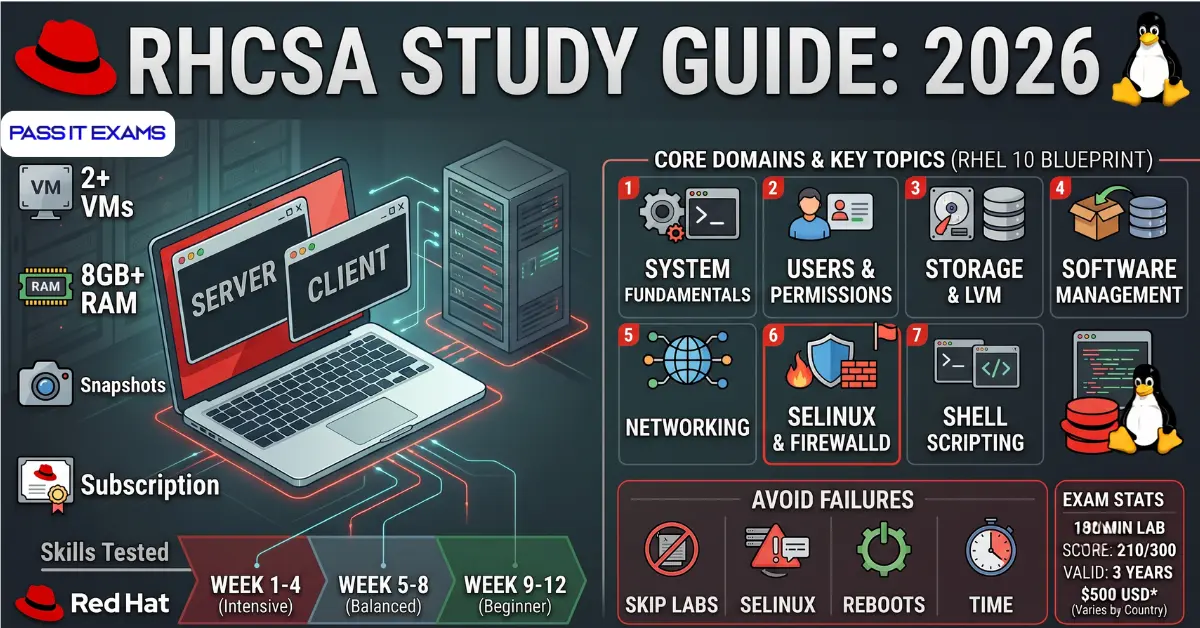
A RHCSA certification study guide is a structured plan that tells you what to learn, in what order, and how to practice for the Red Hat Certified System Administrator exam (EX200). It is built for anyone who wants to become a Linux system administrator, whether you’re new to Red Hat Enterprise Linux or moving up from a junior IT role. This guide covers the exam format, current objectives, week-by-week study plans, lab setup, and the resources that actually help you pass.
Key Takeaways / TL;DR
- RHCSA (EX200) is a hands-on, performance-based Linux certification, not a multiple-choice test.
- The exam runs 180 minutes, requires a score of 210/300, costs around $500 USD, and stays valid for 3 years.
- The current exam is based on RHEL 10, double-check your scheduled version before relying on older study material.
- Core topics: boot/systemd, users/permissions, storage/LVM, networking, package management, SELinux/firewalld, and basic shell scripting.
- Build a home lab with at least two VMs and practice every task until it’s automatic, reading alone will not pass this exam.
- SELinux, boot troubleshooting, and time management are the most common reasons candidates fail.
- RHCSA is the required first step toward RHCE and the broader RHCA architect path.
What Is RHCSA Certification?
RHCSA stands for Red Hat Certified System Administrator. It is an entry-level credential from Red Hat that proves you can install, configure, and manage a Red Hat Enterprise Linux (RHEL) system. Unlike many IT certifications, RHCSA is not a multiple-choice test. You sit at a live RHEL system and complete real administration tasks under time pressure.
The exam code is EX200. Passing it earns you the RHCSA title, one of the most respected entry-level credentials in Linux system administration and a common prerequisite for the RHCE (Red Hat Certified Engineer).
Why RHCSA matters:
- It proves hands-on skill, not memorized theory, since every task is graded on a working system.
- Employers use it as a hiring filter for Linux admin, DevOps, and cloud infrastructure roles.
- It is the required first step before RHCE, RHCA, and most other Red Hat specialist certifications.
- Red Hat Enterprise Linux still runs a large share of enterprise servers, so the skills transfer directly to production work.
Who should pursue it? Anyone targeting a Linux system administrator, DevOps engineer, site reliability engineer, or cloud support role especially in shops that run RHEL, CentOS Stream, Rocky Linux, or AlmaLinux.
RHCSA Exam Overview
| Detail | Information |
|---|---|
| Exam code | EX200 |
| Format | Performance-based, hands-on lab (no multiple choice) |
| Duration | 180 minutes (3 hours) |
| Passing score | 210 out of 300 |
| Cost (US) | $500 USD (varies by country) |
| Validity | 3 years from pass date |
| Delivery | In-person testing center or remote proctored exam |
| Current base OS | Red Hat Enterprise Linux 10 (check your scheduled version) |
The official EX200 exam page confirms that the exam provides a live RHEL system and a list of tasks to complete things like creating users, configuring storage, setting up SELinux rules, or fixing a broken boot process. An automated grader checks whether each task was completed correctly on the system itself. Partial understanding does not earn partial credit; the task either works or it doesn’t.
Red Hat runs a regional pricing model, so the fee outside the US can be lower. There’s no free retake included if you fail, you pay full price again. Because of this, most candidates treat their first attempt as their only shot and prepare accordingly.
Latest RHCSA Exam Objectives (RHEL 10)
Red Hat has moved its official EX200 objective list to RHEL 10. If you’re using an older RHEL 9-era guide, some details have shifted; most notably, Podman and containers are no longer listed as core RHCSA objective domains in the current blueprint. Always confirm which version is associated with your scheduled exam appointment, as some regions still offer older versions during a transition window. Before booking, review the objectives directly on Red Hat’s page rather than relying only on third-party summaries.
Current core objective areas:
- System understanding: boot process, processes, systemd units, and log inspection.
- File and user management: permissions, links, users, groups, and sudo access.
- Storage configuration: partitions, LVM, swap, and automated mounting.
- Software management: RPM, DNF, and repository configuration.
- Networking: static and dynamic IP configuration, hostname resolution.
- Security: SELinux contexts and booleans, firewalld rules.
- Automation basics: shell scripting for simple admin tasks.
- Essential system services: managing and troubleshooting systemd services and targets.
Featured-snippet answer: The RHCSA exam objectives cover system booting, user and group management, storage and LVM, package management with DNF, networking configuration, SELinux and firewalld security, and basic shell scripting, all tested through hands-on tasks on a live RHEL system.
Step-by-Step Study Plans
Pick the plan that matches your current Linux experience and available time.
4-Week Intensive Plan (for candidates with prior Linux experience)
| Week | Focus |
|---|---|
| 1 | Boot process, systemd, users/groups, permissions |
| 2 | Storage: partitions, LVM, swap, mounting |
| 3 | Networking, package management, repositories |
| 4 | SELinux, firewalld, shell scripting, full timed practice exams |
8-Week Balanced Plan (for candidates with basic Linux familiarity)
| Weeks | Focus |
|---|---|
| 1–2 | Linux fundamentals, command line, file system navigation |
| 3–4 | Users, groups, permissions, systemd, boot troubleshooting |
| 5–6 | Storage, LVM, swap, package management, repositories |
| 7 | Networking, SELinux, firewalld |
| 8 | Shell scripting, full practice exams, weak-area drills |
12-Week Beginner Plan (for candidates new to Linux)
| Weeks | Focus |
|---|---|
| 1–3 | Linux basics: files, directories, text editors, command line tools |
| 4–5 | Users, groups, permissions, sudo |
| 6–7 | systemd, boot process, log files |
| 8–9 | Storage, LVM, swap, automated mounts |
| 10 | Networking and package management |
| 11 | SELinux and firewalld |
| 12 | Shell scripting, three full timed practice exams, review |
Whichever plan you choose, spend at least 60% of study time inside a real lab, not reading. RHCSA is graded on doing, not knowing.
Essential Lab Setup & Practice Environment
You cannot pass RHCSA by reading alone. Set up a home lab before you start studying topics in depth.
Minimum lab requirements:
- A host machine with at least 8 GB RAM (16 GB is more comfortable) and 50+ GB free disk space.
- A hypervisor: VirtualBox, VMware Workstation/Fusion, or KVM/libvirt on Linux.
- At least two RHEL virtual machines; one to act as a server, one as a client, so you can practice networking and remote management tasks between them.
- Red Hat’s no-cost Developer Subscription for Individuals provides individual users with legal access to RHEL for personal study. Full eligibility and setup details are in the official subscription FAQ.
- Snapshot capability in your hypervisor, so you can break something on purpose, then roll back and try again.
Recommended lab routine:
- Build a fresh VM.
- Complete a topic’s tasks (for example, LVM setup) without notes.
- Break the VM on purpose; remove a mount entry, misconfigure networking then fix it.
- Snapshot before major changes so failed experiments don’t cost you rebuild time.
Topic-by-Topic Study Breakdown
Boot Process and systemd
Know how to change the default target, boot into rescue or emergency mode, and reset a lost root password.
- Practice command: systemctl set-default multi-user.target
- Common pitfall: Forgetting to relabel SELinux contexts after a manual /etc/fstab edit, which can prevent the system from booting.
Users, Groups, and Permissions
Master useradd, usermod, groupadd, ACLs, and special permissions (SUID, SGID, sticky bit).
- Practice command: setfacl -m u:username:rwx /path
- Common pitfall: Confusing primary and supplementary groups when creating new accounts.
Storage and LVM
Be fluent in creating physical volumes, volume groups, logical volumes, and resizing them live.
- Practice command: lvextend -L +2G /dev/vgdata/lvdata && resize2fs /dev/vgdata/lvdata
- Common pitfall: Adding an entry to /etc/fstab with a typo, which can leave the system unable to boot.
Networking
Practice both nmcli and NetworkManager configuration files for static IPs and hostname resolution.
- Practice command: nmcli con mod eth0 ipv4.addresses 192.168.1.50/24 ipv4.method manual
- Common pitfall: Forgetting to bring the connection back up after editing it.
Package Management
Know DNF repository setup, package installation, and module streams.
- Practice command: dnf module list postgresql
- Common pitfall: Assuming an offline repo is reachable without checking /etc/yum.repos.d/.
SELinux and firewalld
This trips up more candidates than any other topic. Practice context labeling and boolean toggles, not just “setenforce 0.”
- Practice command: semanage fcontext -a -t httpd_sys_content_t “/web(/.*)?” && restorecon -Rv /web
- Common pitfall: Fixing a permissions issue but ignoring the SELinux context, resulting in the service still failing.
Shell Scripting
Basic scripts using loops, conditionals, and positional parameters are enough, RHCSA does not require advanced programming.
- Common pitfall: Overcomplicating scripts under time pressure instead of using the simplest working solution.
Best Free & Paid Resources
Free resources:
- Red Hat’s official product documentation for RHEL, which always matches the current exam version.
- Red Hat’s no-cost Developer Subscription for Individuals for legal, unlimited personal-use RHEL access.
- Community distributions like Rocky Linux or AlmaLinux for extra practice VMs when you run low on Red Hat subscription seats.
Paid resources:
- Official Red Hat training courses, Red Hat System Administration I (RH124) and II (RH134), which map directly to the exam objectives. Experienced admins can instead take the combined RHCSA Rapid Track course (RH199/RH200), which bundles the exam voucher.
- Third-party video courses that walk through each objective with hands-on labs.
- Reputable practice exam platforms that simulate the performance-based exam format under a timer.
- Study books that focus on command-line practice rather than theory-only reading.
Choose paid resources based on how you learn best: instructor-led courses suit people who need structure, while books and self-paced labs suit independent learners.
Practice Exam Strategy & Time Management Tips
- Time-box each task. With 180 minutes and roughly 12–20 tasks, budget no more than 12–15 minutes per task on your first pass.
- Skip and return. If a task stalls you for more than a few minutes, move to the next one and come back at the end.
- Verify every task before moving on. Reboot the system after major changes (like fstab edits) to confirm it still boots, a graded task that “looks right” but breaks the boot is a failed task.
- Read the full task list first. Some tasks depend on each other; knowing the whole list helps you sequence your work.
- Simulate real exam conditions. Take at least three full practice exams with a strict timer and no notes before booking the real one.
- Save the hardest topic for a fresh mind. If SELinux is your weak point, don’t attempt it exhausted at the end of a 3-hour session.
Common Mistakes That Cause Candidates to Fail
- Studying theory instead of practicing tasks. Reading about LVM is not the same as building and resizing volumes under time pressure.
- Ignoring SELinux. Many candidates disable it during practice out of frustration, then fail exam tasks that require correct SELinux configuration.
- Not testing reboots. A broken /etc/fstab entry can leave a system unbootable, and this is not always obvious until you restart.
- Poor time management. Spending 40 minutes stuck on one task instead of banking partial credit across all tasks.
- Using outdated study material. RHEL versions change, and some older guides teach commands or cover objectives that no longer align with the current exam.
- Skipping the practice exam step. Candidates who never simulate the full timed environment are often surprised by the pace of the real exam.
- Weak command-line fluency. Relying on GUI tools during study, when the real exam is entirely terminal-based.
After Certification: Career Path & Next Steps
Passing RHCSA opens a clear next step: the RHCE (Red Hat Certified Engineer), exam code EX294, which focuses on automation with Ansible. RHCSA is a hard prerequisite for RHCE, as confirmed on Red Hat’s own RHCE and RHCSA overview page.
Beyond RHCE, Red Hat offers the RHCA (Red Hat Certified Architect) path, which requires passing several additional specialist exams covering topics such as OpenShift, automation, and cloud infrastructure.
Keep in mind that the RHCSA certification remains valid for 3 years and requires active renewal, Red Hat’s official certification renewal page outlines exactly which exams keep your credential current.
Typical roles that value RHCSA:
- Linux System Administrator
- Junior DevOps Engineer
- Cloud Support Engineer
- IT Infrastructure Technician
- Site Reliability Engineer (entry-level)
RHCSA alone can strengthen a resume for junior admin roles. Combined with RHCE, it signals both administration and automation skills, which is what most mid-level infrastructure jobs require today.
Frequently Asked Questions FAQ’s
What is the RHCSA certification study guide for?
An RHCSA certification study guide is a structured plan of topics, timelines, and lab exercises designed to help candidates prepare for and pass the EX200 exam.
How long does it take to study for RHCSA?
Most candidates need 4 to 12 weeks of study, depending on prior Linux experience, with daily hands-on lab practice being more important than the total number of hours read.
Is RHCSA hard to pass?
RHCSA is considered challenging because it is a hands-on, performance-based exam with no multiple-choice questions, so success depends on practical skill rather than memorization.
How much does the RHCSA exam cost?
The RHCSA exam (EX200) costs $500 USD in the United States, with regionally adjusted pricing in other countries.
How long is the RHCSA certification valid?
The RHCSA certification is valid for three years from the date you pass the exam.
What Linux version is the current RHCSA exam based on?
The current RHCSA exam is based on Red Hat Enterprise Linux 10, though candidates should confirm the version tied to their specific exam appointment.
Do I need prior Linux experience before starting RHCSA study?
No, but candidates without prior experience should plan for a longer study timeline, such as the 12-week beginner plan, to build command-line fluency first.
Can I take the RHCSA exam remotely?
Yes, Red Hat offers a remote proctored exam option in addition to in-person testing centers.
What comes after RHCSA?
The next step is usually the RHCE certification (EX294), which focuses on automation using Ansible and requires RHCSA as a prerequisite.
Is SELinux really tested on the RHCSA exam?
Yes, SELinux context management and boolean configuration are core areas of focus, and they are among the most common reasons candidates lose points.
What is the passing score for RHCSA?
Candidates need a minimum score of 210 out of 300 to pass the RHCSA exam.
Are Podman and containers tested on the current RHCSA exam?
In the current RHEL 10-based objective list, containers and Podman are not listed as core RHCSA domains, unlike some older RHEL 9-era study materials still in circulation.
